
Tilt-shift photography covers two different optical movements. Tilt changes the plane of best focus; shift changes framing while you keep the camera's orientation under control. A software miniature blur is a third, separate operation: it changes an existing image, not the lens position at capture.
Start with the job. Do you need more of an angled surface in focus, a tall building framed without tipping the camera upward, or a deliberately miniature-looking scene? The examples below distinguish those choices. They are credited manufacturer teaching examples, not a record of our own lens test.
Tilt versus shift: what each movement does
| Movement | What it changes | A useful job |
|---|---|---|
| Tilt | The orientation of the plane of best focus relative to the sensor | Place focus along an angled surface, or deliberately restrict where useful sharpness falls |
| Shift | Which part of the lens's larger image circle falls on the frame | Include more of a building or foreground while keeping the camera level, or adjust composition |
Do not confuse tilting the lens with pointing the whole camera up or down. They have different purposes. A lens may provide both movements, but you do not have to use both for every photograph.
Nikon's PC-lens explanation describes focus-plane selection and the level-camera shift workflow. Read the instructions for your actual lens: controls, movement limits and rotation arrangements are model-specific.
What tilt does to focus
In a simplified lens model, when the lens and sensor planes are parallel, the plane of best focus is approximately parallel to the sensor. Tilting the lens changes its orientation through the scene. Depth of field is the range judged acceptably sharp around that focus plane, not the plane itself.
You can use tilt in opposite ways:
- Align focus with an angled tabletop, rock surface or ground plane so important near and far details share useful focus.
- Place the focus plane away from much of the scene to create a selective-focus treatment.
Tilt is not a universal increase in sharpness or a way to make every object sharp at any aperture. Aperture, focus position, subject depth and the available movement still matter. Objects standing above your chosen surface may fall outside useful focus even when the surface looks sharp.
Here is an optical example reported in Nikon's John Shaw master class:
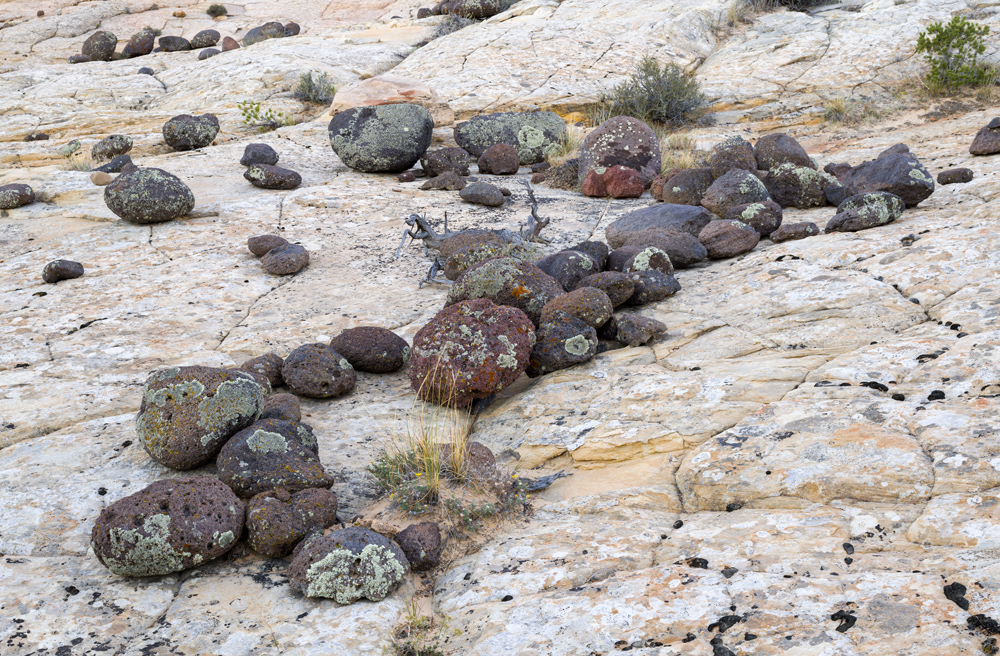
The rocks recede across the stone surface while useful detail remains visible through the composition. That is a different intention from a miniature blur. This single published image does not show the tilt angle or a matched zero-tilt control, so it should not be read as a measured depth-of-field comparison.
For your own practice, photograph a permitted tabletop or ground surface from a fixed position. Make a zero-tilt frame, then a carefully focused tilted frame at the same aperture. Compare the actual near, middle and far details rather than assuming the lens movement worked.
What shift does to perspective
When you tip a camera upward to include a tall building, its vertical edges can converge in the image. Keeping the camera level avoids that vertical convergence; upward shift lets you include more of the building without making the same camera tilt.
For a straight-on elevation, camera alignment with the facade also matters. A level camera can still show receding horizontal lines in an oblique view. Shift does not make every line parallel, erase barrel distortion, or guarantee accurate proportions at an extreme wide-angle framing.
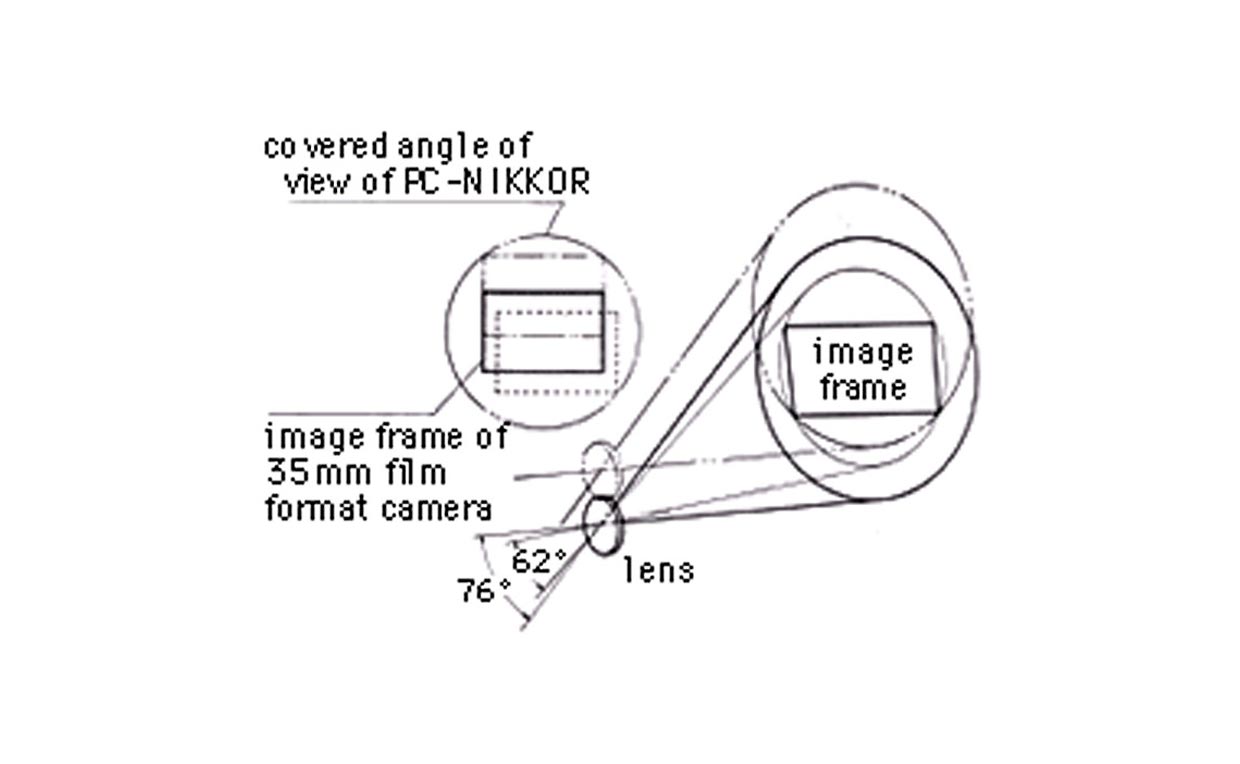
Nikon's archived PC-NIKKOR manual illustrates the larger image circle and the portion selected by the frame:
The same archive shows this building comparison:
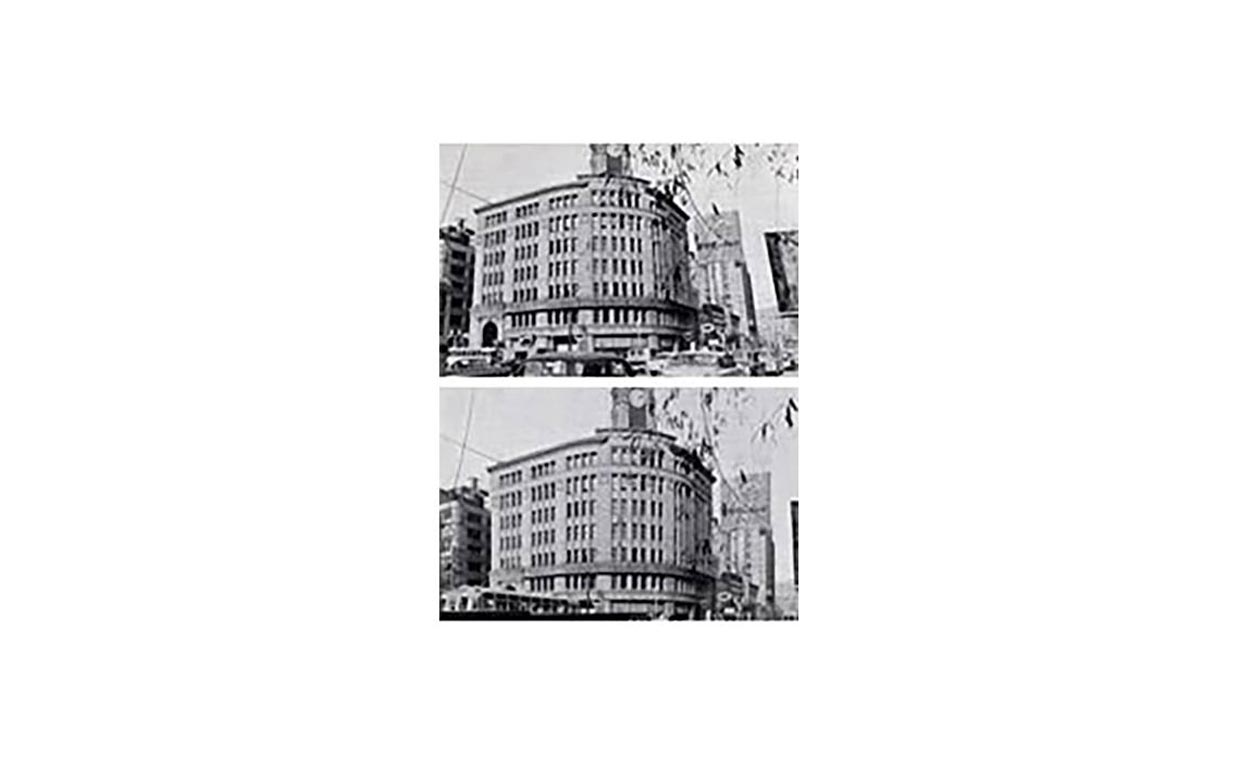
Compare the outer building edges and the window columns, not just the roofline. The low-resolution historical figure explains the geometry; it is not suitable for judging modern edge sharpness.
Shift can help with building framing, interior composition, a straight-on artwork view and controlled space above or below a subject. It does not replace correct camera position or alignment. The architecture guide covers that larger shooting job.
Lens tilt-shift versus software miniature effect
A blur filter does not rotate the optical focus plane. Likewise, a geometry transform does not change which details were actually resolved at capture.
| Approach | Strengths | Limits |
|---|---|---|
| Optical tilt and shift | Choose a focus plane and frame with controlled camera orientation during capture | Requires compatible equipment, careful focus/alignment and attention to the lens's usable movement range |
| Software miniature blur | Adjust a stylized blur on an existing photograph; separate geometry tools can also correct convergence | Blur cannot restore genuinely unfocused capture detail; perspective transforms may stretch, resample and crop the image |
Software perspective correction is possible. It is simply not the same tool as a miniature blur. This example from Adobe's perspective lesson shows a correction to a building photograph:
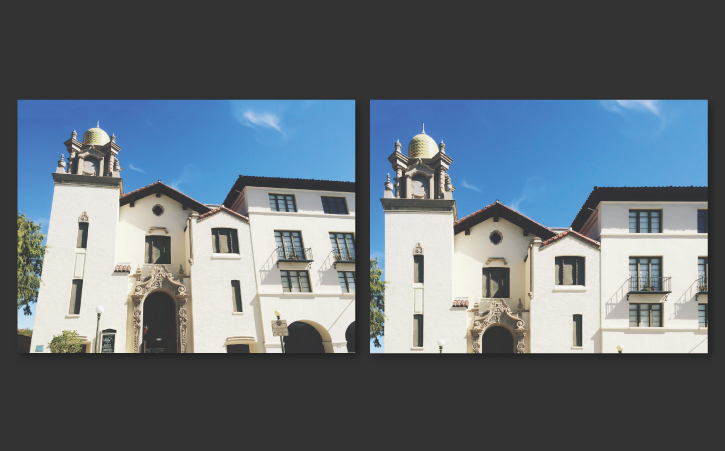
Look at the tower and facade alignment, then the changed coverage around the edges. Straightening lines can cost framing. Adobe's lesson explains the blank-edge and crop issue; its Upright documentation describes the correction modes.
A suitable optical capture may reduce later correction work. Software remains useful when a lens movement was not available or a modest adjustment is appropriate. Neither approach creates missing scene coverage or a different camera viewpoint after the fact.
When to use tilt-shift photography
Choose the technique for the required image, not because “tilt-shift” is an attractive effect name:
- Architecture: controlled framing with the camera level, when the brief calls for straight verticals.
- Interiors: deliberate camera height, alignment and composition; check whether an oblique view is intentional.
- Products on surfaces: focus-plane placement when the relevant detail follows an angled surface.
- Landscapes: useful focus along the ground, without assuming every raised object will be sharp.
- Elevated city or transport scenes: an intentional miniature interpretation, where that treatment fits the use.
- Creative portraits: selective focus, with careful attention to the intended eyes or other important detail.
Keep a neutral version when the client also needs a clear proof, documentary record or technical product view. A stylized blur can hide defects and details that the viewer needs to assess.
How to shoot a miniature tilt-shift effect
An elevated view with small buildings or vehicles can suggest looking down at a model. It is not a requirement for every creative use of tilt, nor does blur alone guarantee a convincing miniature.
For a proposed optical practice sequence:
- Choose a permitted, stable viewpoint with safe access. Do not climb barriers or improvise a position near traffic, railways or an unprotected edge for the effect.
- Identify the small-scale scene and one subject that must remain readable.
- Make a simple composition and a neutral reference before changing the lens movement.
- Apply a small tilt adjustment according to the lens instructions rather than copying a universal angle.
- Refocus on the important subject and inspect the actual sharp region.
- Capture a few controlled variants, noting aperture, focus and movement so you can compare them.
- Apply restrained contrast or color changes only if the intended style calls for them.
This is a practice plan, not a shoot we performed. If you do not have a tilt-capable lens, make a suitable normal photograph and try a labeled software treatment instead.
Software example: Adobe's Edit your first photo lesson, in the “Add creative effects” segment, demonstrates Tilt-Shift Blur. These two frames show the lesson's edited village photograph before and after that filter:
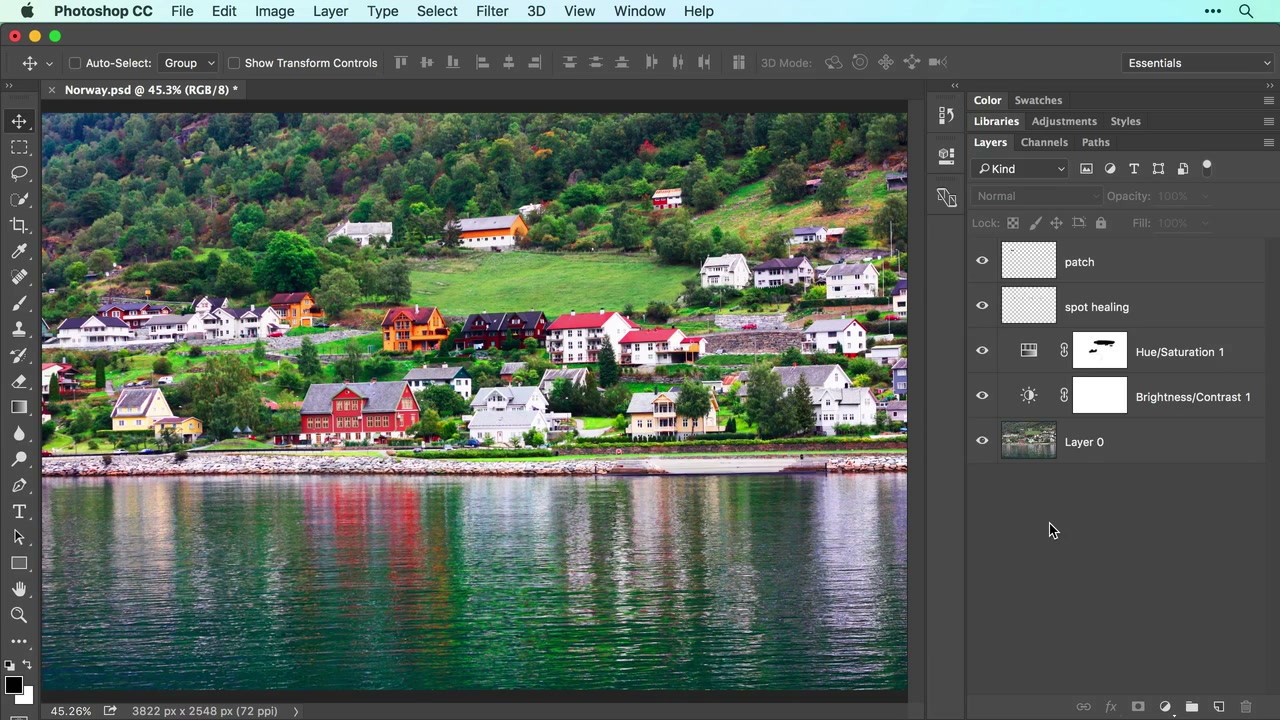
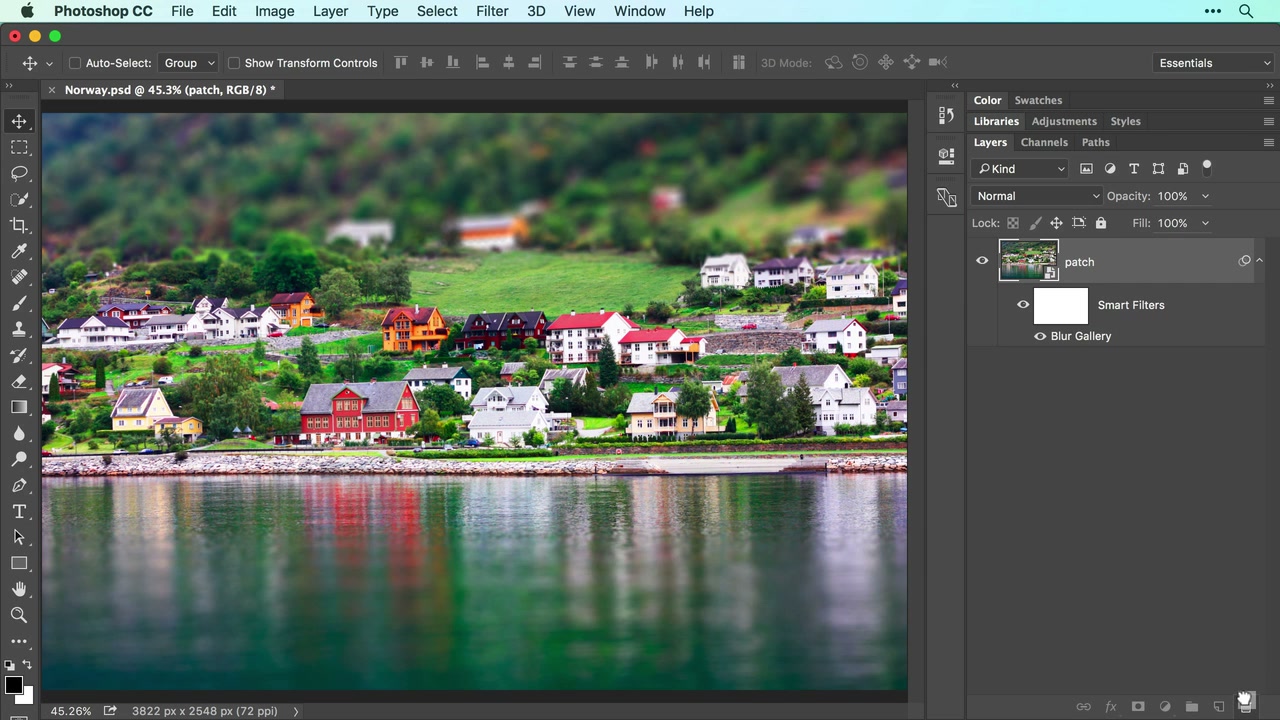
The buildings, shoreline and viewpoint remain in the scene; the upper hillside and lower water become softer. That is the useful distinction from shift: this operation changes apparent sharpness, not camera orientation or framing geometry. The lesson frames are documentary examples, not licensed source photos for a reader's client deliverable.
The broad horizontal treatment is easy to see here. On a more complex scene, a person, tree or tower crossing the transition may need careful masking. A convincing effect should follow the intended depth cues, not blur a tall subject halfway up merely because it crosses a screen-space line.
How to use shift for architecture and interiors
Use a stable support and enough time to inspect geometry. The following is a proposed procedure, not a substitute for a lens manual:
- Set the camera position and level its pitch and roll. For a frontal elevation, also align appropriately with the facade.
- Inspect the neutral frame without pointing the camera upward just to include the roof.
- Shift within the lens's permitted range to refine the coverage.
- Inspect illumination and detail at the edges; excessive movement can create a less usable result.
- Check building verticals, the horizon and any intentionally receding lines. Do not try to force all horizontal lines parallel in an oblique view.
- Leave appropriate crop margin and capture a neutral reference when the brief or comparison needs one.
If the required frame cannot be achieved within the usable image circle, reconsider the position, orientation or delivery brief. Do not assume maximum shift is always the right setting.
For accurate architectural documentation, agree on what corrections are allowed. A visually straightened marketing image is not automatically a dimensional survey.
Editing tilt-shift images
Separate two editing decisions: geometry and selective blur. Correct only what the brief permits, and preserve a master before creating a stylized version.
For software miniature blur, Adobe's current Blur Gallery guidance describes Filter > Blur Gallery > Tilt-Shift, on-image controls and Smart Filter support. Use a Smart Object for a reversible filter workflow. Position the sharp area and adjust the transition and blur while previewing the result; do not rely on a prescribed pixel amount for every image.
Before export, check:
- Is the intended subject in the useful sharp area?
- Do the transitions make sense for the scene's depth?
- Are trees, people, cars and building edges handled cleanly?
- Does contrast help the subject without disguising lost detail?
- Is the treatment consistent across the set where consistency is needed?
- Does the result remain understandable at its intended viewing size?
For geometry correction, use the appropriate perspective controls rather than expecting the blur filter to straighten lines. Check stretching, blank boundaries, cropping and whether the resulting shape still fits the brief.
Keep the layered or catalog-based master. Mask tall objects carefully when appropriate and compare the final export against the neutral version. The photo-editing workflow guide covers the broader master-to-export process.
Delivering specialized tilt-shift projects
An architectural or creative assignment may include a neutral view, an optically controlled capture, a geometry-corrected export and a stylized blur version. Label them so the client can tell what they are approving.
An illustrative naming scheme is Facade-neutral, Facade-perspective-corrected and City-miniature-stylized. These are descriptions of file purpose, not built-in download modes or evidence of a completed job.
SendPhoto's gallery delivery is the presentation and handoff stage after editing. Check the uploaded versions, access settings and download controls for the actual gallery. If proofs and finals need different access or download policies, use separate galleries rather than assuming a collection label creates a privacy boundary.
“Original” names the uploaded-file download quality, not an earlier RAW or editing master. Enabled watermark and download settings can change which file the recipient receives. Keep your own backup and editing originals; a delivery gallery is not an optical editor or an archival guarantee.
Tilt-shift mistakes to avoid
- Calling every band of software blur a real lens-tilt result.
- Making blur so heavy or poorly masked that subjects look cut out.
- Tipping the camera upward while expecting shift alone to remove the resulting convergence.
- Forgetting camera alignment when a level-camera architecture view is needed.
- Assuming tilt makes every subject sharp without checking focus and aperture.
- Treating software perspective correction as impossible, or treating it as free of crop and resampling costs.
- Hiding required documentary or technical detail with a stylized treatment.
- Delivering neutral, corrected and creative files without clear labels.
Quick decision guide
Choose optical tilt when the capture needs deliberate focus-plane placement. Choose shift with controlled camera alignment when framing is the problem and the available lens movement supports the job. Check both the intended sharp region and the frame edges.
Choose software miniature blur when the intended result is a stylized treatment of an existing suitable image. Choose software perspective tools when an appropriate geometry correction is needed; do not confuse them with blur.
For practice, hold the viewpoint and aperture steady where possible, change one decision, and compare actual files. Record whether the difference came from lens movement or editing. That makes the result more useful than attaching “tilt-shift” to every selective-focus image.
When the versions are ready, create a SendPhoto gallery for the client handoff. Keep the capture, editing and delivery decisions distinct.