
A strong photo editing workflow is not about using every slider. It is about choosing the best images, correcting the technical problems, creating a consistent look, exporting the right files, and delivering them clearly.
This photo editing workflow is a practice curriculum for portraits, weddings, events, families, products, personal projects and portfolio work. It covers decisions from backup to delivery, with documented Lightroom Classic export controls and exercises to try yourself. It is not an advanced Photoshop course or a report of our own RAW-to-print test.
The Complete Editing Workflow
Think of editing as a sequence. If you skip culling or file organization, color and retouching become harder later.
| Stage | Goal | What to decide |
|---|---|---|
| Import | Protect the files | Folder naming, backups, catalog location |
| Cull | Choose the strongest images | Sharpness, expression, duplicates, story coverage |
| Correct | Make the image technically clean | Exposure, white balance, crop, lens issues |
| Style | Create a consistent look | Contrast, color, tone, black and white choices |
| Retouch | Remove distractions | Skin, dust, objects, temporary marks |
| Export | Match the final use | Web, print, client download, social, archive |
| Deliver | Make images easy to find | Collections, privacy, download permissions |
Start With File Safety
Editing should never put the only copy of a photo at risk. Before deep editing, create a simple file routine.
File safety checklist:
- Copy the card to a clearly named folder.
- Keep the original files untouched.
- Back up the folder before formatting the card.
- Use consistent naming for dates, clients, events, and projects.
- Keep exported files separate from original files.
- Store final galleries in a way that can be found later.
For client work, use a naming pattern that still makes sense six months later, such as 2026-05-portrait-smith-family or 2026-05-brand-session-client-name. Avoid exposing private client details in public filenames.
Keep backups of the original photos and the information needed to reproduce edits. In Lightroom Classic, a catalog backup does not include the photographs; back those up separately, as Adobe’s catalog-backup guidance explains. Check that backup files can be opened before reusing a card. A second folder on the same drive does not protect against that drive failing.
Cull Before You Edit
Culling is where the edit starts. The goal is not to keep every usable frame. The goal is to choose the frames that best tell the story or serve the client.
Flag these as candidates to exclude from the delivered set, rather than deleting original files during this exercise:
- Missed focus on the subject.
- Motion blur that does not look intentional.
- Closed eyes or unflattering expression.
- Duplicate frames with no meaningful difference.
- Distracting objects that cannot be fixed cleanly.
- Poor timing compared with a stronger frame.
Keep images with:
- Clear subject and strong moment.
- Good expression, gesture, or emotion.
- Useful variety in wide, medium, and close frames.
- Important people, products, or details.
- Strong composition even if minor correction is needed.
Try a fast first pass, then a stricter second pass based on the brief. Preserve required coverage and useful alternatives instead of treating fewer images as an automatic improvement. Lightroom Classic distinguishes removing a catalog entry from deleting a file from disk; review the action before confirming it.
Correct Exposure and White Balance
Before applying a style, make the photo technically believable.
Start with:
- Exposure for the subject.
- White balance that makes skin, whites, and neutrals feel natural.
- Highlights that preserve important detail.
- Shadows that support the scene without looking muddy.
- Crop and straightening.
- Lens correction if distortion or vignetting distracts.
Do not chase perfect brightness everywhere. A backlit portrait, candlelit dinner, concert or dark reception should still feel like the light that was there. Compare neutral references where available; mixed light may need local corrections rather than one white-balance value. Lowering highlights cannot restore detail that was never recorded in any channel.
Build a Consistent Look
Style is where many photographers over-edit. A preset or color grade can help, but it should not fight the subject.
Ask these questions:
- Is the image warm, neutral, cool, high contrast, soft, colorful, or muted?
- Does the style fit the session and client?
- Are skin tones believable?
- Do black clothing, white dresses, flowers, products, or brand colors still look credible?
- Does the set feel consistent from image to image?
Review the set together. An unexplained jump from warm, soft tones to green, harsh tones can distract from the sequence. Intentional changes can still work; consistency does not require identical settings for different light.
Retouch With a Light Hand
Retouching should remove distractions without making people or products look artificial.
Common retouching tasks:
- Temporary blemishes.
- Dust, lint, hair, and small marks.
- Sensor spots.
- Exit signs, small background distractions, or edge clutter.
- Flyaway hairs when they pull attention.
- Uneven shine or color patches.
Be cautious with body shape, skin texture, age lines, product labels and anything tied to identity or accurate representation. Clarify client preferences before heavy changes. In documentary work, removing objects or changing a scene can change its meaning; follow the assignment’s rules. Review retouched edges and repeated textures at full size and at the intended display size.
Edit by Genre
Different photography jobs need different priorities.
| Genre | Editing priority | Watch out for |
|---|---|---|
| Portraits | Skin tone, eyes, expression, background cleanup | Over-smoothing skin or whitening eyes too much |
| Weddings | Consistency across changing light | Mixed color from venues and receptions |
| Events | Fast useful delivery and clear story | Too many duplicates and weak candids |
| Products | Accurate color, clean edges, readable detail | Distortion, dust, and inaccurate brand colors |
| Families | Natural warmth and expression | Over-editing children or making sets inconsistent |
| Personal projects | Intentional mood | Style overpowering the subject |
Export for the Final Use
Export settings should match where the photo will go. A print file, web portfolio image, social post, and full-resolution client download do not need the same export.
Before exporting, decide:
- Does the client need full-resolution files?
- Are web-sized images enough for preview or sharing?
- Will the images be printed?
- Should the files be grouped by collection?
- Should filenames be simple enough for the client to understand?
- Does the gallery need privacy controls?
Documented Lightroom Classic Export Controls
Select the edited photos, choose File > Export and Export To > Hard Drive. Choose a separate destination and review naming, format, sizing, sharpening, metadata and watermark options before exporting. See Adobe’s basic export workflow.
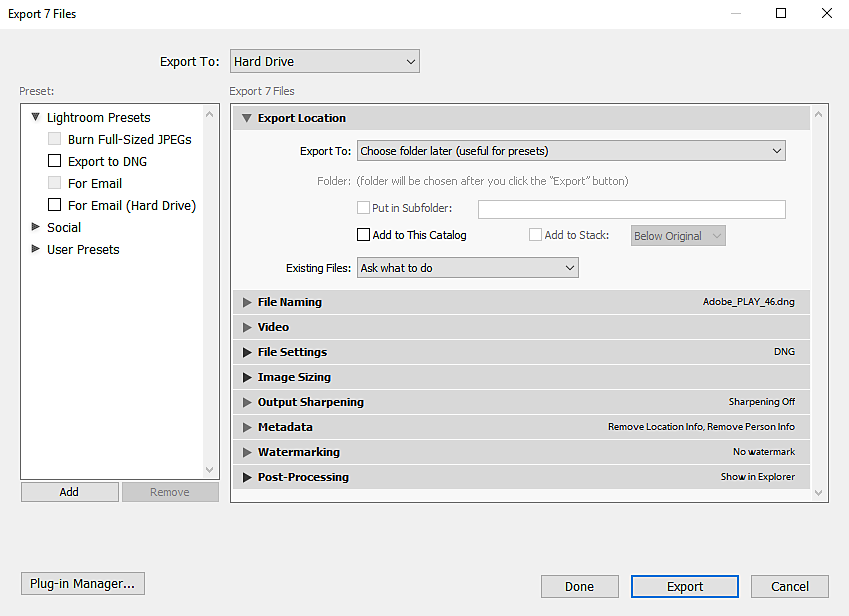
The following settings are proposed exercise starting points, not measured quality thresholds or universal client requirements:
| Exercise output | Proposed settings | What to inspect |
|---|---|---|
| Web preview | Standard SDR JPEG, sRGB, quality 80; Resize to Fit: Long Edge 2400 pixels; Don’t Enlarge | Actual dimensions, fine detail, file size and any unwanted metadata |
| Full-size edited photo | Standard SDR JPEG, sRGB, quality 90; Resize to Fit unchecked; watermark according to the agreed deliverable | Dimensions after cropping, edited appearance and correct filename |
| Print submission | Use the lab’s required format, profile, dimensions and resolution; prepare a separate export | Required crop, lab specifications and a proof when color accuracy matters |
Confirm the color profile, pixel dimensions and output sharpening for the destination. JPEG is lossy; compare results rather than treating one quality number as lossless. Lightroom’s Original RAW export preserves original-format image data with metadata in a sidecar; choose a rendered format for an edited photo the recipient can view. Adobe documents these export options.
Pixel dimensions and print resolution answer different questions. As a calculation, 3600×2400 pixels at 300 pixels per inch corresponds to 12×8 inches. Changing the resolution tag alone adds no detail; this calculation is not a tested print result. Match the lab’s requirements rather than assuming every job needs 300 ppi.
Inspect location and other identifying metadata in the exported files, as well as visible faces, signs and filenames. Available removal controls depend on the format; a checkbox is not a complete privacy review.
For a deeper beginner editing foundation, read how to edit photos for beginners.
Deliver Edited Photos Professionally
Editing does not end when the files leave your software. The client experience matters.
A clean delivery workflow helps clients:
- Browse images on phone and desktop.
- Find the right part of the shoot.
- Download only what they are allowed to download.
- Share with family, staff or collaborators only within the agreed audience.
- Understand which images are final.
SendPhoto supports named collections, favorites, optional gallery passwords and downloads subject to global and collection settings. Use gallery delivery to organize the agreed set and download control for the permitted download options. Collection names do not create separate audience passwords. Favorites indicate preferences, not approval or publication permission.
Photo download settings include Original and Scaled down; Original with watermarking can use a generated marked image, and ZIP downloads include permitted collections. Keep your original files and independent final exports. Sharing expiry closes sharing; it is separate from deletion and cannot recall previously downloaded copies.
For private portraits, family sessions, boudoir, events or sensitive work, an optional shared password can be part of delivery. A recipient can forward it, so it does not establish identity. Disabled downloads cannot prevent capture of viewable content. Agree the intended audience and retention period separately.
Practice Assignments
These are proposed practice assignments, not tests we performed. Use non-sensitive photographs you are entitled to edit and keep their originals and backups.
Assignment 1: One Image, Three Corrections
Choose one RAW file your editor supports. In Lightroom Classic, make three virtual copies using Create Virtual Copy in the photo’s context menu; these store alternative edits in the catalog rather than creating three independent photo files. Other editors may need separate working copies. Try these three looks:
- Clean and natural.
- Warm and soft.
- High contrast and dramatic.
Compare which version fits the subject best. Keep unused experiments without deleting the original. Export the chosen look to create a separate rendered file. See Adobe’s photo-management and virtual-copy guidance for the distinction between catalog versions, removal and deletion.
Assignment 2: Ten-Image Consistency Test
Choose ten images from one session. Edit a representative image, then use it as a reference for the other nine. Group similar lighting conditions and adjust each frame rather than copying every value indiscriminately. Review the set for color shifts, exposure jumps and inconsistent contrast, then inspect individual details.
Assignment 3: Client Export Test
Export a small web set and a full-size edited set into separate folders, using the proposed settings above or your own requirements. Open the exported files on the intended displays. Check filenames, pixel dimensions, profile, sharpness, color and metadata; device differences are not proof of accurate color. If practicing delivery, use an agreed non-sensitive sample to check that recipients can find the final set and understand the permitted download options. Keep this exercise separate from public client delivery.
Photo Editing Checklist
- Back up files before editing.
- Cull before deep correction.
- Fix exposure and white balance before styling.
- Protect skin tone, product color, and important highlights.
- Retouch distractions without changing the subject unnaturally.
- Keep a consistent look across the set.
- Export for the actual use.
- Organize the final gallery so the client can find images quickly.
A strong edit is quiet when it needs to be and intentional when it needs to be. The viewer should notice the photo first, not the software.