
Good wildlife photography starts with patience and distance. Learn the animal's behavior, stay quiet, work with light, use enough shutter speed for movement, and never disturb wildlife just to get a closer frame. The strongest images show the animal naturally in its habitat.
This wildlife photography guide covers practical field technique, gear tradeoffs, ethical choices, editing, and delivery for photographers who want better nature images without unsafe or intrusive habits.
Put the animal first
Check the location's current wildlife distances, closures and species guidance before going out. A calm-looking animal is not permission to approach, and a long lens does not make a prohibited position acceptable. If a rule, ranger instruction or the animal's behavior requires more distance, stop photographing and follow the site's retreat guidance.
For a location-specific example, Yellowstone's photography guidance requires at least 100 yards from bears or wolves and 25 yards from other wildlife, and also prohibits disturbing or displacing animals. Those are Yellowstone rules, not universal safe distances for every animal or park.
Avoid:
- Baiting wildlife for a photo
- Approaching nests, dens, or young animals
- Blocking an animal's path
- Chasing or cornering a subject
- Playing sounds to force a reaction
- Entering restricted or fragile habitat
- Touching, feeding, or handling wildlife
For birds, read Audubon's ethical photography guidance, compiled by Melissa Groo, Kenn Kaufmann and Jim Verhagen with other contributors. It addresses nests, disturbance, playback, drones and sensitive locations. For beginner practice, choose ordinary observation from permitted paths rather than photographing a nest or trying to provoke action.
Learn behavior before choosing settings
Understanding behavior helps you anticipate moments instead of reacting too late.
Watch for:
- Feeding patterns
- Repeated perches or paths
- Grooming or stretching before movement
- Head direction and body tension
- Weather changes that affect activity
- Light direction at different times of day
A proposed beginner exercise is to watch a common bird, such as a red-winged blackbird, from an existing permitted viewing point. Notice where it perches and how the light reaches it; compose a habitat frame without moving toward it or using calls. If observing that perch would put you near a nest or interfere with the bird, choose another subject. This is a practice plan, not a reported field session.
Choose gear by reach, light, and mobility
Longer focal lengths help you keep distance, but gear is always a tradeoff. A large lens may give more reach, while a lighter setup may help you walk farther and react faster.
Consider:
| Need | Gear priority |
|---|---|
| Small or distant animals | Longer focal length |
| Low-light forest work | Wider aperture and good high-ISO performance |
| Long hikes | Lighter camera and lens combination |
| Birds in flight | Fast autofocus and comfortable handling |
| Habitat images | Wider lens or shorter telephoto |
Use the reach you already own before buying more. A 70–300mm zoom may cover larger animals or a habitat view from a permitted position; 400–600mm coverage can help with smaller or more distant birds. These are examples of focal-length ranges, not a shopping shortlist or a promise that the animal will fill the frame. Sensor format, subject size and lawful viewing distance all matter. Accept a smaller subject, crop within the file's usable resolution, or leave without the photograph rather than closing the gap.
Use shutter speed for movement
Wildlife rarely stays still for long. Faster shutter speeds help freeze movement, especially with birds, running animals, splashing water, or quick gestures. Slower speeds can work for resting subjects or intentional motion blur, but they require care.
Practical tips:
- Use faster speeds for flight, running, jumping, or wing movement.
- Increase shutter speed when using longer focal lengths.
- Brace your body or use support when possible.
- Review sharpness during calm moments.
- Do not sacrifice all image quality chasing a perfectly clean ISO.
A sharp, expressive image with some noise is often more useful than a clean file with motion blur in the face or eyes. The following are proposed available-light starting points, not settings measured in our own wildlife test. Set an ISO limit suitable for your camera, inspect the result, and change the plan if the light cannot support it.
| Practice subject | Starting shutter | Starting aperture | Check before continuing |
|---|---|---|---|
| Relatively still perched bird | 1/500s | f/5.6 if available | Eye detail, head movement, camera shake and exposure |
| Bird in flight | 1/2000s | f/5.6–f/8 if light permits | Tracking, wing/body blur and whether ISO or exposure has reached a limit |
| Still animal with habitat | 1/250s | f/8 if the needed focus depth permits | Subject movement and whether important habitat details are acceptably sharp |
Use a faster shutter when motion or shake remains; stabilization helps camera movement, not a moving animal. Continuous autofocus can help with movement, but tracking modes and animal-eye detection vary by camera. Check the relevant manual and review actual focus rather than assuming detection guarantees sharpness. For a stationary subject, select the intended eye or head when detection chooses a branch instead.
Focus on eyes, gesture, and habitat
A wildlife photo is usually stronger when the eye is sharp and the body language feels alive. But habitat matters too. A tight portrait can be beautiful, while an environmental frame can tell a fuller story.
Look for:
- Eye contact or a visible eye
- Clean head angle
- Separation from the background
- Natural behavior, such as feeding, grooming, flying, or resting
- Habitat details that explain the place
- Light that shapes the subject
Do not fill every frame with the animal. Sometimes the surrounding reeds, trees, rocks, snow, or water make the image more meaningful.
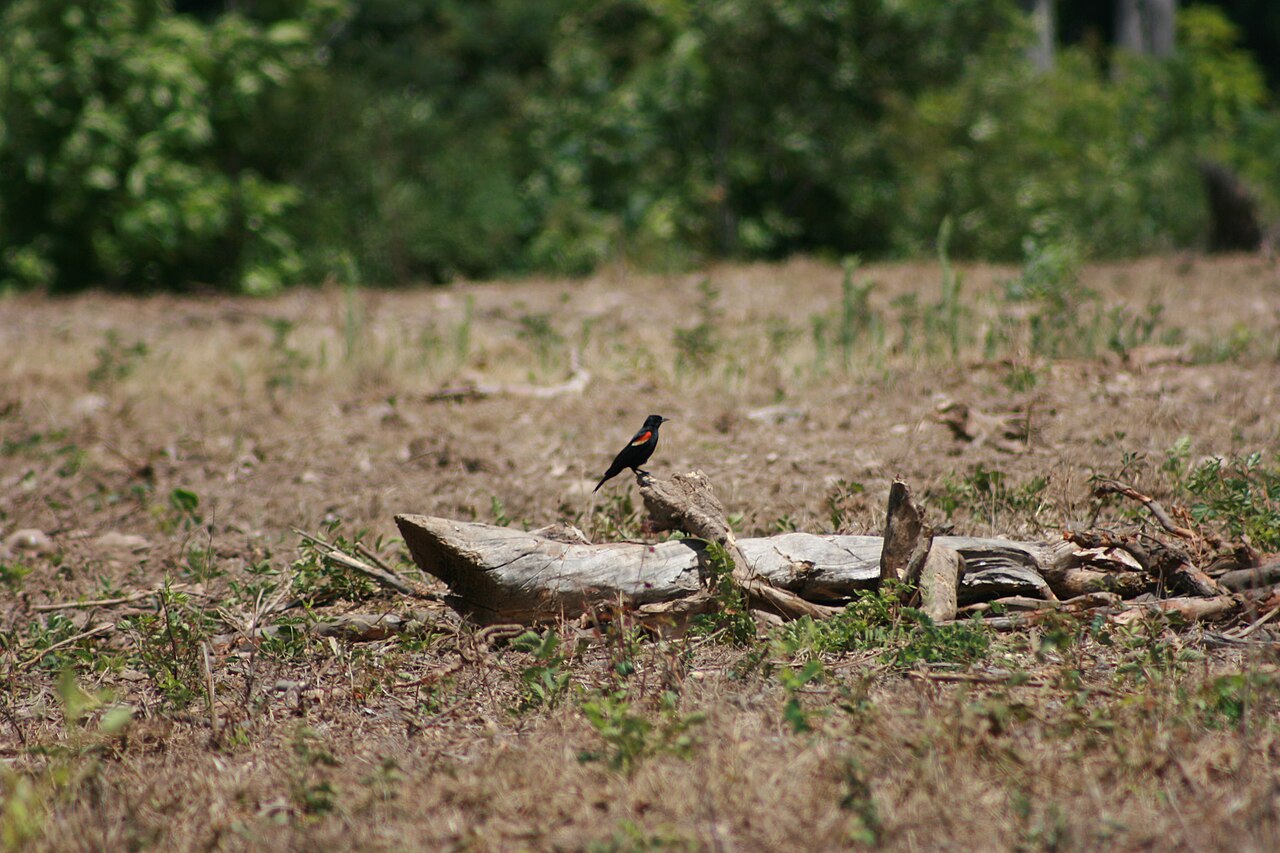
Red-winged Blackbird by Cody Hough (IvanTortuga), via Wikimedia Commons, CC BY-SA 3.0. Wikimedia's 1280px rendition; resized from the source, with no additional crop or retouching by SendPhoto.

The source file's metadata lists a Canon EOS DIGITAL REBEL XTi, 300mm, 1/640s, f/5.6 and ISO 100. These describe that photograph, not a universal recipe. In the displayed rendition, the bird occupies a small part of the scene, its red shoulder patch separates it from the muted surroundings, and the log gives it a clear perch. The background retains habitat context rather than becoming an empty blur.
Use the frame to decide what your own picture needs: retain the environmental view, or make a crop that still has enough detail for its intended output. You cannot infer the photographer's distance, use of a hide, or the absence of disturbance from the photograph or exposure metadata alone.
Work with light and background
Early and late light can be easier to shape, but any light can work if you understand what it is doing.
Try:
- Front light for clear detail
- Side light for shape and texture
- Backlight for rim light or silhouettes
- Overcast light for soft detail
- Dark backgrounds for separation
- Low shooting angles when safe and appropriate
Backgrounds can ruin otherwise strong wildlife images. Move a little left or right when possible to avoid bright branches, busy edges, or lines crossing the animal's head.
Stay quiet and predictable
Wildlife responds to sudden movement. Move slowly, keep a steady pace, and avoid repeated standing, crouching, and rushing.
Field habits that help:
- Arrive early and wait.
- Keep gear noise low.
- Follow the site's guidance on food, equipment and wildlife attractants.
- Use natural cover without damaging it.
- Watch from a respectful distance before photographing.
- Leave space for the animal to move away.
Do not wait for repeated alarm. Stop if your presence changes behavior, blocks a route or causes the animal to focus on you instead of its activity. A bird that freezes rather than flying away can still be stressed. Follow local species-specific guidance for backing away; do not apply one encounter procedure to every animal.
Plan a simple field workflow
A repeatable workflow keeps you from missing opportunities.
Before leaving:
- Check weather and light direction.
- Read current access rules, closures, wildlife distances and species-specific encounter guidance for the location.
- Pack batteries, cards, water, and appropriate clothing.
- Clean lens and check camera settings.
- Decide whether the goal is birds, mammals, habitat, or general practice.
In the field:
- Move slowly into position.
- Watch behavior before shooting.
- Compose for background and light.
- Shoot short sequences during action.
- Review only when it will not cost you the moment.
After the session:
- Back up files.
- Cull missed focus and repeated frames.
- Keep private field notes on behavior and conditions; do not publish sensitive coordinates.
For camera fundamentals, see the photography for beginners guide.
Edit wildlife photos honestly
Wildlife editing should clarify the image without misrepresenting the scene. Adjust exposure, crop, contrast, color and noise carefully. Preserve the original and an editing master. For documentary or competition submissions, check the recipient's current rules before removing objects, compositing or using generative edits; label a creative composite so it cannot be mistaken for a single observed event.
Editing checklist:
- Is the eye sharp enough?
- Does the crop give the animal room to move or look?
- Are colors believable for the light?
- Is noise reduction preserving feather, fur, or skin detail?
- Does sharpening create halos?
- Does the image still show natural behavior?
For beginner-friendly editing steps, see how to edit photos for beginners.
Share wildlife images with context
Use captions to explain what is actually known about the animal, habitat and circumstances. Do not invent a patient field encounter from a photograph alone. Identify captive subjects or substantial creative alterations where relevant, and avoid sensitive location details for vulnerable wildlife.
Before sharing a sensitive image, prepare a separate delivery copy and check more than its visible caption:
- Remove GPS coordinates from the exported file. In Lightroom Classic's Export dialog, the Metadata panel has a Remove Location Info option; Adobe notes that it is unavailable for DNG exports. See Adobe's export metadata documentation.
- Inspect the actual export with a metadata viewer. Do not assume an export preset or social platform removed everything.
- Check filenames, keywords, captions, visible signs, maps and gallery titles for clues to a sensitive location. A missing GPS field does not make an identifiable place anonymous.
- Upload only the intended copies. If downloads are enabled, inspect a downloaded file too; a website's resized preview does not prove that its downloadable original is safe to share.
For a client, publication, conservation group or portfolio reviewer, agree on the allowed uses, captions and which delivery files they need. SendPhoto's gallery delivery can present finished exports separately from social previews. Choose the intended access and download settings before sharing; gallery access, a watermark or a collection name is not a location-redaction tool or a usage licence. Keep the capture originals and an independent archive outside that handoff. Gallery visits or favorites alone do not establish editorial approval.
Wildlife photography mistakes to avoid
- Getting too close because the lens is short
- Cropping so tightly that the image loses habitat
- Ignoring background distractions
- Using shutter speeds too slow for movement
- Editing colors until the scene looks artificial
- Sharing sensitive locations publicly
- Treating animal stress as a sign of action
- Keeping too many similar frames after a burst
Wildlife photography checklist
Ethics:
- Keep distance.
- Avoid disturbance.
- Respect access rules.
- Leave if the animal changes behavior.
Technique:
- Watch behavior first.
- Use enough shutter speed.
- Focus on eyes and gesture.
- Work with light and background.
- Include habitat when it adds story.
Workflow:
- Pack light enough to move safely.
- Back up files after the session.
- Cull repeated frames.
- Edit naturally.
- Check GPS, captions and visible location clues in the actual delivery files, then share with accurate context.
Wildlife photography improves slowly because it depends on field time. The more you learn the animals, the habitat, and your own limits, the more often you will be in the right place without forcing the moment.