
Start with a sharp star field
Astrophotography for beginners starts with one realistic goal: make a sharp, clean photo of the night sky. You do not need to begin with deep-space gear or complicated tracking equipment. A camera with manual controls, a sturdy tripod, a wide lens, and a clear plan can take you a long way.
The first challenge is that night photography gives the camera very little light. That means you need to control focus, exposure time, aperture, and ISO yourself. Once you understand those pieces, your first successful star photo becomes much more predictable.
Beginner Setup at a Glance
- Keep the camera still: use a tripod and timer or remote release.
- Set focus deliberately: magnify a bright star and check a saved frame.
- Gather light: start with a wide aperture and an exposure short enough for your star-sharpness goal.
- Keep editing latitude: capture RAW if your camera supports it.
- Plan the sky: check clouds, moon position, access and local light pollution.
Gear You Need to Start
You can begin with simple gear:
- Camera with manual exposure controls.
- Wide or standard lens.
- Sturdy tripod.
- Fully charged batteries.
- Empty memory card.
- Headlamp or small flashlight.
- Warm clothing and safe footwear.
A wide lens makes it easier to include more sky and keep stars from streaking during a longer exposure. A lens with a wide aperture helps gather more light. If your lens has a smaller maximum aperture, you can still learn focus and framing. Raising ISO can brighten the recorded image, but it does not collect the light that a wider aperture or longer exposure would.
For a broader foundation in exposure, read camera settings for beginners before your first night shoot.
Plan the Night Before You Go
Astrophotography is much easier when the sky cooperates. Check the basic conditions before leaving:
- Cloud cover.
- Moon phase and moon position.
- Light pollution from nearby towns or streets.
- Safe access to the location.
- Weather, wind, and temperature.
- Foreground interest, such as trees, rocks, cabins, or water.
A dark sky helps, but you can practice close to home. Start by learning focus and exposure in a safe place, then travel farther once your process feels comfortable.
Camera Settings to Try First
For an untracked wide-angle star field, use manual exposure, RAW, manual focus and a timer or remote release. The numbers below are a test sequence for a tripod-mounted full-frame camera with a 20mm lens, not a universal preset or a promise of a finished Milky Way image.
- First test: 10 seconds, f/2.8 and ISO 3200, if your lens opens to f/2.8. Use a fixed white balance such as 4000 K to keep previews consistent.
- Inspect: magnify stars near the center and edges, then check overall brightness and highlight clipping.
- If sharp but dark: try 15 seconds at the same aperture and ISO, then inspect again. Alternatively open the lens if available. Use ISO to adjust recorded brightness once the motion and aperture choices are suitable.
- If stars trail: shorten the time, even if the image becomes darker. A brighter streak is not a sharper star.
These are proposed starting settings. A longer focal length, different camera resolution, a different part of the sky or a stricter viewing size can require a shorter exposure. An 18mm APS-C lens does not have the same field of view as a 20mm full-frame lens. PhotoPills explains how the NPF rule accounts for sensor, aperture and focal-length differences. Its NPF calculator is in the PhotoPills app; the calculator on that web page uses the simpler 500/600 rules. Treat any estimate as a starting point and inspect a real test frame.
A real night-sky example with recorded settings
Nikon publishes the photograph below by Paul Van Allen with a D850, 20mm f/1.8 lens, 15 seconds, f/1.8 and ISO 5000. It demonstrates a real exposure combination; it is not our test frame or a guarantee that those settings suit your sky. Nikon's Milky Way guide provides the photographer credit and capture details.
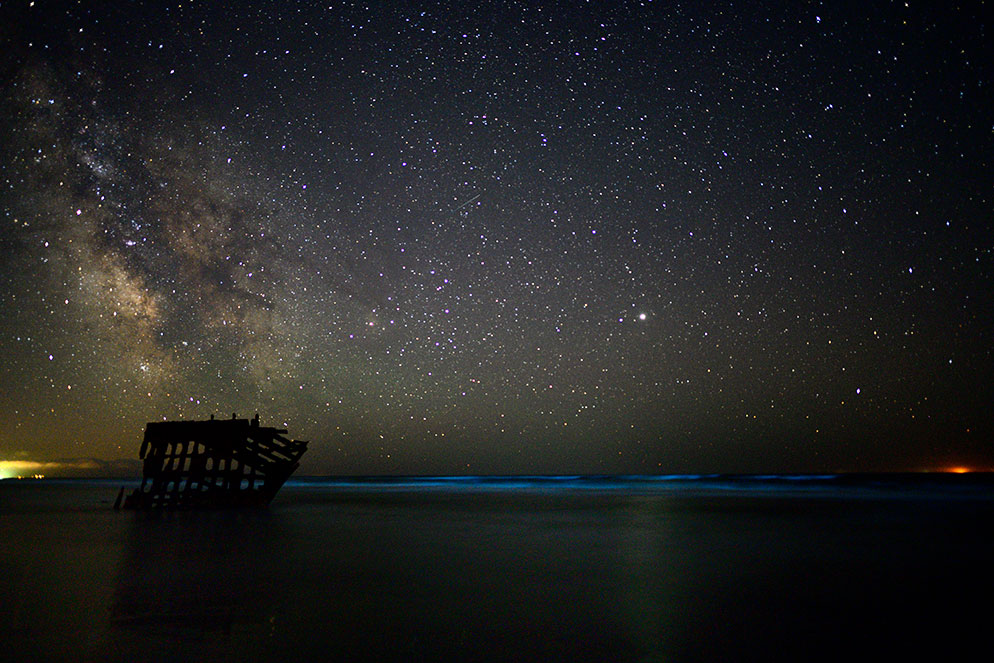
The foreground remains largely a silhouette, while the sky supplies the main detail. Your first result need not show bright detail everywhere. Compare star shape and unwanted highlight clipping before trying to match the brightness or color of a published photograph.
Test result → next adjustment
| What the test shows | Try next |
|---|---|
| Small, round stars; frame too dark | Open the aperture if possible or lengthen time only while stars remain acceptable. Then adjust ISO for brightness. |
| Short streaks across the sky | Shorten exposure time and compare. Check for tripod movement too. |
| Soft blobs even in a short exposure | Refocus using magnified live view; inspect the lens for condensation. |
| Center stars sharp, corners stretched | Try closing the aperture one stop and recheck; corner lens performance may be the limit. |
| Bright sky glow or clipped lights | Reduce recorded brightness and reframe away from local lights; more ISO will not remove sky glow. |
| Very noisy image after brightening | Check whether more light can be captured without trailing. Do not assume lowering ISO alone fixes an underexposed frame. |
Change one setting at a time and keep the test frames. Ian Norman's measured ISO and exposure comparison explains why the light captured and the camera's sensor behavior matter; lower ISO is not automatically a cleaner result at the same final brightness. For the basic exposure controls, see our low light photography guide.
Manual Focus in the Dark
Focus is where many first attempts fail. Autofocus often searches in the dark and locks onto the wrong thing.
Use this focusing process:
- Switch the lens to manual focus.
- Use live view if your camera has it.
- Find a bright star, planet, distant light, or moon edge.
- Magnify the view on the screen.
- Turn the focus ring slowly until the point looks as small and sharp as possible.
- Take a test shot.
- Zoom into the photo to confirm stars are sharp.
Do not trust the infinity mark blindly. Many lenses focus past infinity, and focus can drift as conditions change. Recheck after changing focal length or moving the focus ring. A nearby foreground may need a separate focus decision; sharp stars do not guarantee a sharp object close to the camera.
Composition for Night-Sky Photos
A sky-only image can be beautiful, but beginners often get stronger results by adding a foreground. Trees, mountains, water, rocks, buildings, and silhouettes give the viewer a place to stand.
Try these compositions:
- Milky Way above a simple tree line, when its position suits your location and date.
- Star field above a cabin or tent.
- Reflections in calm water.
- Foreground rocks leading toward the sky.
- Silhouette of a person with a headlamp used carefully.
Keep the foreground simple. In the dark, clutter is hard to control, and complicated scenes can become confusing.
Star Points, Star Trails, and Creative Choices
There are two common beginner directions.
Point stars
Use a short enough exposure for stars to stay mostly point-like at your intended display size. This is a good first goal because it teaches stable tripod work, focus, and exposure.
Star trails
Use a longer exposure or combine a sequence to show the apparent movement of stars as Earth rotates. Plan focus, battery life and gaps between frames. Nikon's night-sky guide distinguishes star points, trails and time-lapse; they are different capture goals.
Choose one goal before you shoot. Mixing both without a plan often leads to images that look accidentally blurred.
Editing Basics
Editing night-sky photos is about bringing out detail while keeping the image believable.
Basic steps:
- Adjust exposure and contrast.
- Lower highlights if the moon, horizon, or lights are too bright.
- Lift shadows carefully.
- Set a pleasing white balance.
- Add clarity or texture lightly.
- Reduce noise without smearing stars.
- Crop for a stronger foreground and sky balance.
Keep your first edit to one frame so you can see what focus and exposure achieved. If you later blend separate sky and foreground exposures, stars move between frames while the ground stays still: a normal HDR merge is not automatically a star-aligned stack. Keep the originals and describe a composite honestly when the distinction matters.
First-Night Checklist
Before leaving:
- Charge batteries.
- Pack tripod and memory cards.
- Check clouds, moon, and weather.
- Pick a safe location.
- Bring warm layers and a light.
- Set camera to RAW.
At the location:
- Set up tripod on stable ground.
- Compose with a simple foreground.
- Focus manually.
- Take a test exposure.
- Zoom in to check star sharpness.
- Adjust shutter, ISO, or aperture.
- Shoot several variations.
After the shoot:
- Review focus before deleting anything.
- Edit a small set first.
- Export web versions and full-resolution versions separately.
- Save notes about what settings worked.
For export choices, the photo resolution guide can help you decide how to prepare images for sharing or delivery.
Sharing Your Night-Sky Photos
If you photograph an event, workshop, travel session, proposal, or portrait under the stars, delivery matters. A gallery is easier for clients to browse than a message thread full of files.
For a client night session, upload the finished exports to a SendPhoto gallery and organize them into clearly named collections, such as Final Photos and Behind the Scenes. Configure sharing and download settings for the intended audience using the gallery setup guide. Keep RAW files and backups separately; a delivery gallery is not your only archive.
FAQ
What camera settings should beginners use for astrophotography?
For the 20mm full-frame example in this guide, try manual mode, RAW, 10 seconds, f/2.8 and ISO 3200, with careful manual focus. Inspect the result before changing settings. Different lenses, cameras and sky conditions need different values.
Do I need a special lens for astrophotography?
No. A wide lens with a wide aperture helps, but you can learn the basics with modest gear as long as you use a tripod and manual controls.
Why are my stars blurry?
Common causes include missed focus, tripod movement, too long an exposure for point stars, or camera shake from pressing the shutter.
Can I photograph stars near a city?
You can practice near a city, but darker skies usually make stars easier to photograph. Start somewhere safe and learn the process before planning remote trips.
Should beginners shoot RAW?
Yes, RAW files give more room to adjust exposure, color, and noise during editing.
Start with one sharp frame and a record of its settings. When you have a finished client set, create a SendPhoto gallery to share the selected exports.