
Introduction
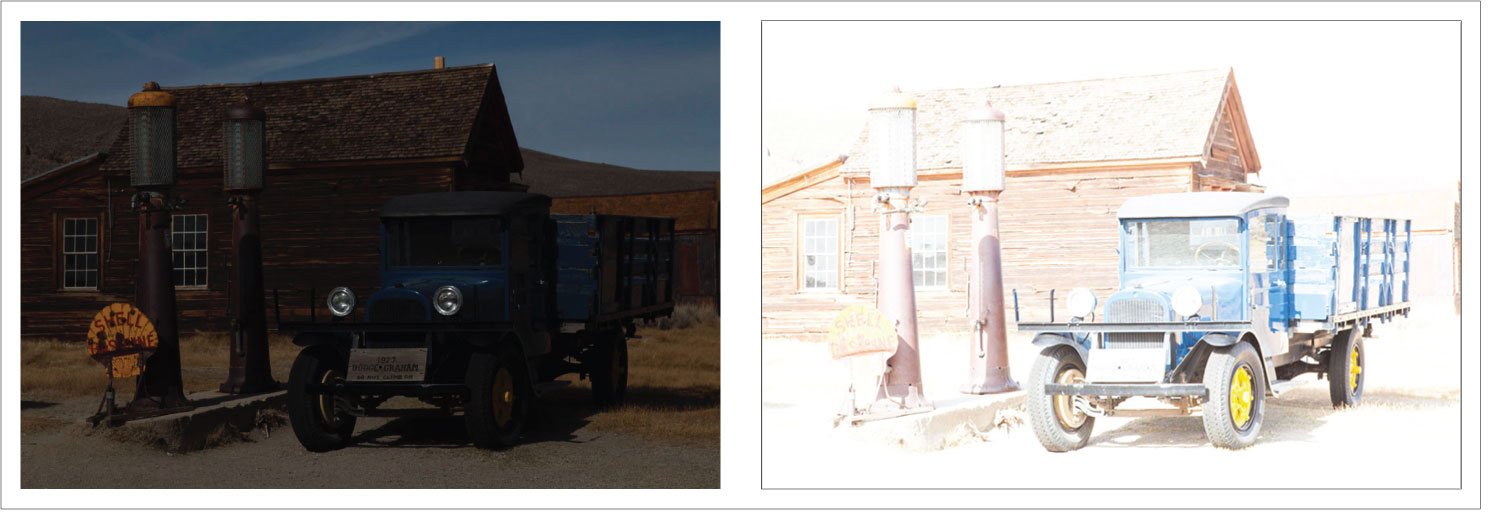
HDR photography helps when one exposure cannot hold both bright highlights and dark shadows. Exposure bracketing gives you a controlled set of lighter and darker frames, then an HDR merge combines the useful detail from each one.
Used well, HDR looks natural. It keeps the sky from turning white, the room interior from going black, and the final image from feeling overprocessed. Used carelessly, it can create halos, muddy contrast, noisy shadows, and ghosted movement. The difference starts with deciding whether the scene actually needs bracketing and capturing the frames cleanly.
What HDR Photography Actually Solves
HDR stands for high dynamic range. This article focuses on merging exposure brackets when one capture cannot record the important highlights and shadows satisfactorily. HDR is a broader concept: a single-capture file or processing pipeline can also carry extended-range information; HDR does not universally mean a multi-frame merge.
Common HDR situations include:
- Real estate interiors with bright windows and darker rooms.
- Landscapes at sunrise or sunset where the sky is much brighter than the foreground.
- City scenes at night with bright signs and deep shadows.
- Backlit portraits where the background matters, although portraits need extra care.
- Church, venue, or architectural interiors with mixed light.
HDR is not a magic fix for every difficult photo. If the image is blurry, badly composed, or captured with clipped highlights in every frame, a merge will not recover what was never recorded. For fundamentals that affect every exposure, start with the camera settings for beginners guide.
Capture range and display range are different. Combining exposures does not automatically make an exported file an HDR-display image. A merged master can be rendered to an ordinary SDR JPEG; HDR display output needs a suitable export and compatible viewing chain. Adobe’s HDR output documentation explains that distinction and SDR preview. No HDR-screen behavior is demonstrated by the JPEG and PNG examples below.
Bracketing vs HDR
Exposure bracketing is the capture method used here. An HDR merge is one use of those frames; you can also choose a single bracketed exposure without merging.
When you bracket, you take several frames at different exposure values. One frame protects highlights, one captures a normal exposure, and one or more frames brighten the shadows. Many cameras can do this automatically with AEB, or auto exposure bracketing.
HDR merge software then aligns the frames and blends detail from the useful parts of each exposure.
| Term | What it means | Why it matters |
|---|---|---|
| Exposure bracketing | Capturing multiple exposures of the same scene | Gives you highlight, midtone, and shadow detail |
| AEB | Camera mode that shoots bracketed frames automatically | Reduces handling time and helps keep frames consistent |
| EV spacing | Exposure difference between frames, such as 1 EV or 2 EV | Controls how wide the bracket covers the scene |
| HDR merge | Combining bracketed frames into one image | Creates an editable merged master; delivery format is a separate choice |
| Ghosting | Movement artifacts from changing subjects between frames | Can ruin leaves, people, water, cars, or clouds |
When to Use HDR and When to Skip It
Use HDR when important detail is lost at both ends of the exposure. A quick test is to take a normal frame and check whether the bright areas are blown out while the shadows are blocked up. If adjusting exposure fixes one side but ruins the other, bracketing is worth trying.
Skip HDR when:
- The subject is moving quickly.
- The scene already fits in one exposure.
- You want deep silhouettes or high contrast.
- The photo depends on candid expression or fast timing.
- You can solve the problem with better light, a reflector, or a changed angle.
HDR is strongest with still scenes. Real estate, landscapes, interiors, and architecture are the cleanest use cases because the camera and subject can stay consistent across frames.
A Simple HDR Bracketing Setup
Start with the cleanest possible capture. The merge is easier when the files line up, the focus does not change, and the exposures cover the scene without waste.
- Compose the frame first.
- Lock focus, or use manual focus if the scene is static.
- Use aperture priority or manual exposure with a shutter-speed bracket setting supported by your camera.
- Keep the aperture and ISO fixed across the frames; check whether Auto ISO would override your intended sequence.
- Let shutter speed change between bracketed frames.
- Use a tripod when possible.
- Use a remote, suitable timer/burst sequence or supported shutter mode to reduce handling shake; check that the whole bracket is captured.
- Shoot RAW if your workflow supports it.
Avoid changing aperture between frames because depth of field changes can make the merge less clean. For the static-scene method here, vary shutter speed. Camera behavior is model-dependent: the Nikon ZR auto-bracketing manual, for example, distinguishes aperture-priority and manual-mode settings, including Auto ISO interactions. Check your own manual rather than assuming AEB holds aperture and ISO in every mode. Disable bracketing again after the sequence.
How Many Frames Should You Shoot?
Use enough frames to record each important area clearly in at least one exposure. More frames add time and opportunities for movement; they do not automatically add useful detail. These are starting options to evaluate, not scene- or camera-independent prescriptions.
| Scene | Starting option | Decision check |
|---|---|---|
| Mild landscape contrast | Three frames at −1, 0, +1 EV | Compare with a single RAW; some merges need only the outer useful exposures. |
| Bright window interior | Three at −2, 0, +2 EV; extend if needed | Inspect the window in the darkest and room detail in the brightest frame. |
| High-contrast architecture | Wider coverage, potentially five to seven captures | Add exposures only for detail missing from the current set, not because of the subject label. |
| Handheld travel scene | A short three-frame sequence if shutter speeds allow | Check the longest exposure and subject movement before relying on alignment. |
| Moving subjects | Prefer a single exposure | Deghosting is not a guarantee of a clean action image. |
Adobe’s Lightroom HDR guidance prioritizes coverage over count. It notes that a ±2 EV bracket generally uses three merge inputs and that tightly spaced captures can contain redundant middle exposures. Keep a normal frame as an alternative, even if it adds little to the merge.
Spacing example, not a field test: with aperture and ISO held constant, one stop doubles or halves exposure time. If the reference is 1/100 second, −2 EV is 1/400 and +2 EV is 1/25. The −2 to +2 set spans four stops from end to end. It is not a recommendation to use these shutter speeds in every scene.
Check the darkest frame for important highlight detail and the brightest for usable shadow detail. Extend darker or brighter only if needed. A camera’s JPEG histogram and preview are useful warnings, but assess the RAW files in your editor too. A clipped highlight in every input cannot be recovered by combining those inputs.
Handheld vs Tripod HDR
A tripod reduces camera movement for a static bracket. It keeps the frames aligned and lets you use slower shutter speeds for the brighter frames without camera shake. For static interiors and twilight landscapes, plan on a stable tripod if the location allows; it will not stop leaves or people moving.
Handheld bracketing can work when the light is strong and the camera can fire frames quickly. Keep your elbows close, use burst or AEB, and avoid scenes with obvious moving detail. Even with alignment tools, handheld HDR is less forgiving.
For low light scenes where shutter speed becomes the main problem, the low-light photography guide covers steadiness, noise, and exposure choices in more depth.
Natural HDR Editing Workflow
Use the documented steps below in Lightroom Classic. This is a documentation-based workflow checked October 4, 2026, not our own merge test. Keep the originals and compare the merge with your best single exposure before calling it an improvement.
- Select the useful bracketed images and choose Photo > Photo Merge > HDR.
- In the preview, use Auto Align for small camera shifts. Compare Auto Tone on and off as a starting adjustment.
- Leave deghosting at None if no movement artifact appears. Otherwise try Low, then increase only if needed; inspect the deghost overlay.
- Choose Merge to create the editable .dng master. Keep the source exposures.
See Adobe’s Lightroom Classic HDR merge instructions. Lightroom desktop uses different controls and shortcuts; follow the documentation for the product you have.
Then review the result rather than assuming the merge is finished:
- Use only source frames that contribute useful detail; exclude blurred or mismatched captures.
- Check alignment around rooflines and other fixed edges.
- Inspect moving regions and compare them with an original frame.
- Keep tonal compression restrained when rendering the wide-range master for SDR.
- Set a black point and contrast that preserve depth rather than brightening every shadow.
- Adjust saturation if colors distract from the subject.
- Look for bright or dark halos around trees, buildings and horizons.
- Export for the intended dimensions, color space and SDR/HDR viewing workflow.
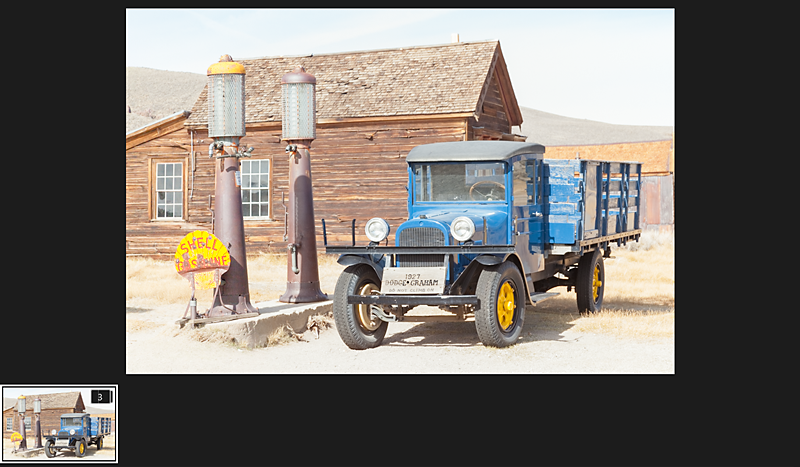
Choose your result with the intended mood in mind. A merge that shows more shadow detail can still be a worse photograph if it flattens the light or creates distracting edges.
Real Estate HDR Example
Suggested scenario, not a reported shoot: for a living room with bright windows, a single exposure often forces a bad choice: expose for the room and lose the view, or expose for the window and make the room too dark.
A practical sequence might include a dark frame for window detail, a normal frame for the room, a bright frame for shadow detail, and two extra frames if the room has very dark corners or strong direct sun.
During the merge, keep the window view believable. Check the balance between the window and room, avoid halos at the frame, and retain a plausible direction of light. Real estate HDR should make the space readable, not surreal.
Landscape HDR Example
Suggested scenario, not a reported shoot: at sunset, the sky can be several stops brighter than the foreground. Bracketing lets you protect cloud color while keeping rocks, trees, or water from becoming solid shadow.
For landscapes, watch for movement. Wind in grass or trees can create ghosting. Water can look strange if the bracketed frames capture different wave positions. Sometimes the best result is a single RAW exposure, a graduated adjustment, or waiting for softer light.
The landscape photography techniques guide can help with composition and light choices before you decide whether HDR is necessary.
HDR Mistakes to Avoid
- Pushing clarity or structure too far.
- Letting halos form around trees, buildings, or mountains.
- Making interiors look flat and shadowless.
- Oversaturating skies and foliage.
- Merging frames with people or cars in different positions.
- Forgetting to remove bad bracket frames before merging.
- Delivering huge files when smaller web files would be more useful.
If the final image will be delivered to a client, export versions that match the intended use. The photo resolution guide explains how size, pixels, and delivery needs fit together.
Delivery Notes for HDR Projects
Separate source brackets, merged masters and approved exports in your working files. Give clients the deliverables agreed for their use rather than every intermediate exposure.
For ordinary web review or a client workflow that has not requested HDR display output, make an SDR export and inspect its appearance. If HDR display output is requested, retain a separate SDR rendition and confirm the required format, app and display with the client. Adobe’s HDR output guide describes SDR preview and tone mapping; it does not establish that a particular gallery service preserves HDR metadata or renders every HDR format correctly.
SendPhoto can present exported client images in galleries and collections, with gallery download controls. See gallery delivery. This article does not verify native HDR-display rendering, merged DNG preview or gain-map preservation in SendPhoto. Use supported finished exports for the agreed delivery workflow; a collection name or download switch does not determine client approval.
HDR Capture Checklist
- Confirm the scene needs more range than one exposure can hold.
- Use a tripod for important static work.
- Keep aperture, focus, and composition consistent.
- Bracket through shutter speed changes.
- Capture a dark enough frame for highlights.
- Capture a bright enough frame for shadows.
- Watch for moving subjects, leaves, clouds, water, and traffic.
- Merge gently and keep believable contrast.
- Inspect edges for halos and moving areas for ghosting.
- Export the final image for the real delivery use.
FAQ
Is HDR the same as bracketing?
No. Bracketing is the process of capturing multiple exposures. An HDR merge combines useful information from those exposures. HDR itself is broader than bracketing and includes capture and display workflows that do not require this multi-frame method.
Is 3-frame bracketing enough?
It can be. Judge the detail recorded across the set and the spacing between exposures. Extend the bracket only when important highlights or shadows are missing; extra overlapping frames may not help.
Can I shoot HDR handheld?
Yes, for some scenes, but it is less reliable than using a tripod. Handheld HDR works best when the camera can shoot the bracket quickly and the subject is mostly still.
Why does HDR sometimes look fake?
HDR looks fake when shadows are lifted too far, halos appear around edges, colors become oversaturated, or local contrast is pushed too hard.
When should I avoid HDR?
Avoid HDR for fast-moving subjects, expressive candid moments, or scenes where strong contrast is part of the creative look.