
The best way to share photos professionally depends on what the recipient needs to do next. Use a client gallery to browse a finished shoot, a proofing workflow to choose images, a shared folder to collaborate on files, or a transfer link for a one-off delivery. Add a storefront when purchasing prints or digital files is part of the job.
A useful handoff answers four questions immediately: Which photos are these? Are they proofs or final files? What should I do with them? When do I need to respond or download? The platform helps, but those instructions make the delivery understandable.
About this guide: SendPhoto publishes this article and is included below. Provider documentation and plan details were checked on September 27, 2026. The recommendations compare documented workflows, not measured speed or customer satisfaction. For a broader product comparison, see photo gallery software; for file-preservation checks, see sending photos without losing quality.
Choose the method before the platform
Share final photos through a client gallery
Choose a gallery when a client needs to browse a portrait session, wedding or event and download the finished work. Group images into clearly named collections and explain the available download choices. Keep previews and final delivery files distinguishable.
A gallery is especially useful when several recipients need to find their way through a large shoot on phones. It is less necessary when an editor already knows which three files they need and simply wants a download link. A professional handoff can use either method.
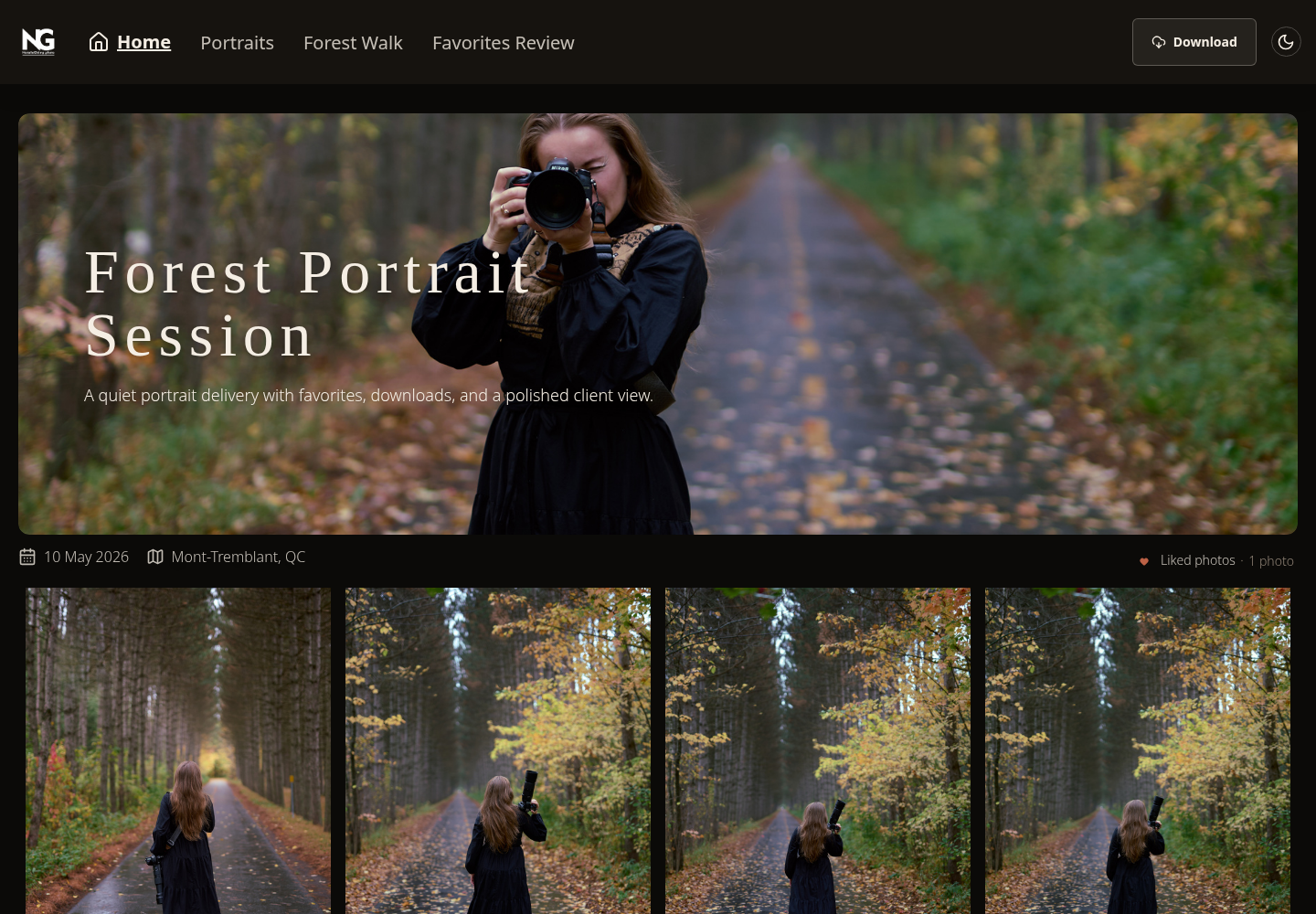
Real SendPhoto gallery screenshot from the existing site assets. It illustrates browsing collections and finding Download. The collection names belong to this example and do not establish a formal approval workflow. View the gallery screenshot at full size.
Share proofs with a clear selection request
Choose a proofing workflow when the client must pick images before retouching, printing or final delivery. Give every image a stable filename or identifier, name one person to send the final selection, and state how many images to choose. Keep downloads limited to the versions appropriate for that stage.
Favorites, comments and approval buttons are different actions. A favorite may mean “I like this” rather than “retouch this exact file.” Tell clients what counts as the final instruction. If your chosen service does not support the required selection workflow, ask for one consolidated list of filenames instead of implying it has formal approval tools.
For example: “Please choose eight images for retouching by Friday. Send one final list of filenames; these are proofs, and the finished downloads will follow after retouching.” Use the actual deadline and agreed image count for the job. Our client proofing guide covers the distinction between a preference and a final decision.
Use a shared folder for continuing collaboration
A shared folder suits a designer, editor or agency that needs files organized by project and version. Separate incoming material, working files and approved deliverables. Give editing access only to people who need to change the shared contents.
Dropbox's sharing documentation distinguishes edit access from view-only links. Edit access can allow adding, editing, downloading, deleting and sharing files. A view-only link can still allow viewing and downloading without a Dropbox account: view-only does not mean download-disabled. Check the permissions in the service you use rather than assuming the labels are interchangeable.
Avoid handing over a changing working folder when the client expects a fixed final delivery. Copy the approved versions into a dedicated final folder and state which files supersede earlier versions.
Use a transfer link for a finished batch
A transfer link is practical when the recipient wants the files rather than a gallery, storefront or ongoing workspace. Package a large batch in a clearly named folder or archive, confirm the supported formats and total size, and state any download deadline.
Keep a separate copy after sending. An expired link does not erase files already downloaded, and a delivery service is not automatically a permanent archive. If the recipient needs original-quality files, direct them to the actual download rather than a saved browser preview.
Use a storefront when the next action is buying
If clients need to buy prints, albums or digital files, use a gallery connected to the relevant store. Decide which items are included in the session and which are purchases. Make download permissions and purchase instructions agree so that a client is not asked to pay again for something already included.
Before choosing a plan, compare supported labs and destinations, self-fulfillment options, platform commission, payment-processing charges and shipping. A “commission-free” plan can still involve other fees. Sales tools are useful when you use them; they need not be part of a simple file handoff.
Use public sharing for an agreed public audience
A portfolio page or social post can help people discover selected work. It serves a different purpose from delivering a private client shoot. Agree which images may be published and whether names, locations or other identifying details belong with them. Keep the full client delivery separate when the public only needs a selection.
Match privacy controls to the job
Decide who may open the link, whether forwarding is acceptable and whether downloading should be enabled. Use the service's available password, invitation and expiry controls where they fit the assignment. Send only the material the recipient is meant to receive.
A password-protected gallery is not automatically end-to-end encrypted. If the assignment specifically requires end-to-end encrypted sharing, choose a service that documents that property and confirm that the sharing workflow meets your requirements. For example, Proton Drive documents encrypted file-sharing links, with optional passwords and expiration dates. This is a separate capability from putting a password on an ordinary gallery.
Access controls cannot undo copies someone has already saved, and disabling downloads cannot prevent every screen capture. Avoid promising that a link, watermark or expiry setting guarantees control after delivery.
Seven gallery options for professional sharing
The providers below are options to evaluate once you have chosen the workflow. They are not ranked by measured quality. Product tiers change, so the linked plan and help pages should determine the final choice.
- SendPhoto for browser-based client gallery delivery.
- Pixieset for galleries with store options.
- Pic-Time for galleries with sales and marketing workflows.
- ShootProof for galleries alongside studio business tools.
- CloudSpot for gallery sharing and favorites-based review.
- SmugMug for photo hosting, presentation and selling.
- PhotoShelter for Photographers for photographer libraries, client access and licensing-related sales.
1. SendPhoto
SendPhoto fits a studio that wants clients to open a browser gallery without creating a client account. Collections organize the shoot; sharing and download controls determine access. Use the first-gallery tutorial for upload, sharing and download setup.
Why it stands out
The useful distinction is its delivery focus. You can organize a shoot into collections, set optional password protection and configure downloads without needing to make store purchases part of the handoff. Choose the intended gallery or collection download settings and label the work clearly.
The Free plan has 5 GB storage, one gallery and 10 GB lifetime upload credits. Deleting files does not reset those lifetime credits. Check SendPhoto pricing for current paid-plan allowances rather than choosing solely from a headline storage figure.
Best fit
Consider it for finished portrait, event or wedding galleries when browsing and controlled downloads are the main tasks. If a commercial job needs formal approval, specialist production formats or print sales, verify those requirements separately. Do not assume that a collection called “Favorites Review” supplies a formal approval system.
2. Pixieset
Pixieset Client Gallery plans combine gallery delivery with options for selling through Store. Website and Studio Manager are separate products, with Suite bundles available; a studio does not need every product merely to deliver photos.
Where Pixieset works best
Consider it when clients should move from browsing to ordering prints or digital files. Compare the store and payment fees for the selected plan, along with the available fulfillment options. For downloads directly from a collection, distinguish the size you enable: Pixieset's download documentation says Original-resolution collection downloads require an upgraded Client Gallery or Suite plan. Its Store download settings are separate.
3. Pic-Time
Pic-Time's Client Delivery Suite combines galleries with sales and marketing features, with storage and capabilities varying by tier. Photo and video allocations should be checked separately when delivering both.
Where Pic-Time earns its keep
Consider it when post-delivery print or album sales are an active part of the business. Allow time to configure the store, audience and intended download permissions. Marketing automation is a reason to evaluate the product, not evidence that every studio will earn more or that every client will prefer the workflow.
4. ShootProof
ShootProof's current plans combine client galleries with contracts, invoices and selling tools on paid tiers. Storage is now expressed in GB, with photo counts shown as estimates; paid plans also include video capabilities.
Why photographers still choose it
It is an option when the studio wants delivery and business administration in one service. Decide how selections, purchases and included downloads will be communicated to the client. Check applicable archive fees and any add-ons before treating the subscription as the whole cost. The provider's current plan table is more useful than assumptions based on older photo-count plans.
5. CloudSpot
CloudSpot's plans offer gallery delivery and sales features, with business-management tools available through broader subscriptions. The Free and Entry plans are JPEG-only; additional format support depends on tier.
Where CloudSpot makes sense
Consider it for a gallery workflow in which clients browse and mark favorites before the final handoff. Explain whether a favorites list is a suggestion or the confirmed selection, and keep proof-stage downloads consistent with that instruction. If you also need contracts, invoices or non-JPEG production files, compare the relevant product and tier instead of assuming every gallery subscription covers them.
6. SmugMug
SmugMug's plans suit photographers combining hosted photo libraries, portfolio presentation and selling. Its unlimited full-resolution JPEG storage is distinct from the optional Source RAW storage add-on.
The real trade-off
Choose around the long-term library and sales features you need, with commerce capabilities checked against the plan. Keeping a hosted JPEG collection does not replace backing up your camera originals and editing files. A studio delivering occasional finished batches may have fewer requirements than one maintaining a large public and private archive.
7. PhotoShelter for Photographers
Evaluate PhotoShelter for Photographers for an individual photographer's library, website and sales workflow. PhotoShelter's organizational asset-management offering is a separate product; do not combine their feature lists.
Best use cases
It is relevant when clients need to revisit a photographer's library or when print, digital and licensing-related sales matter. Check the applicable storage, proofing and commerce features. Define usage terms alongside the delivery: receiving a file should not leave the client guessing which uses were agreed.
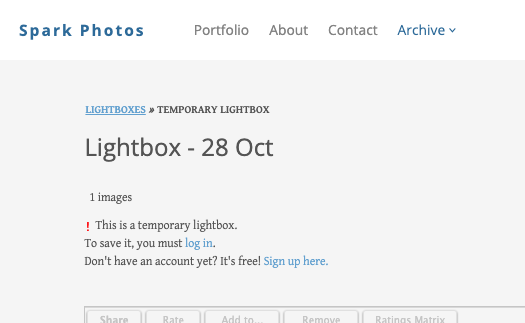
PhotoShelter's older official lightbox screenshot shows the save-and-share account prompt. Its client lightbox instructions explain that a temporary guest lightbox needs an account to be saved and shared. Tell clients about required steps before asking for their selection. View the lightbox example at full size.
Prepare a handoff the client can understand
Use a short delivery note that identifies the stage and next action. These examples are templates to adapt, not messages sent by a platform automatically.
Final delivery: “Your finished portrait gallery is ready. Open the link and use Download to save the final files. Please keep your own copy. Let me know if you need a different file format.” Add the actual access deadline if there is one.
Selection request: “These are proofs for choosing images. Please send one final list of eight filenames by Friday. Retouching and finished downloads will follow after your confirmation.” Replace the count and deadline with the agreed terms.
Team handoff: “The approved files are in the Final Delivery folder. Earlier previews are separate. Please send any change requests in one consolidated reply, quoting filenames.” State who can authorize changes when several people are involved.
Before sending, check the intended recipient link, the visible collection or folder names, the download permission and the version of the files. If you require an account, PIN or password, explain that in the delivery note. Keep internal working material out of the shared destination.
Choosing the right photo-sharing method for your studio
Start with the next action: browse, choose, download, collaborate or buy. Then choose the smallest set of tools that supports that action and the client's access requirements. A shared folder can be right for an editor, a proofing workflow for a retouching selection, and a gallery for a family receiving a finished session.
Use the gallery-software comparison for a broader shortlist and the photo-sharing app guide for browser, home-screen and native-app distinctions. If a browser gallery fits your handoff, explore SendPhoto's plans and follow the getting-started guide.