
You can make most iPhone photos better by following a simple order: choose the best frame, crop and straighten, fix brightness, correct color, refine contrast, sharpen lightly, then export or share the right version. The goal is not to make every photo look dramatic. The goal is to make the subject clearer and the image more intentional.
Start in Apple Photos using the documented iOS 26 controls below. Button placement and available features vary with software and model. The screenshots are genuine Apple User Guide examples, not photos edited or tests performed by SendPhoto. The visual checks also apply in other editors, but their buttons and export options differ.
Start With the Best Frame
Before touching sliders, compare the similar shots in your camera roll. Repeated attempts often include one frame with better expression, steadier hands, or cleaner composition.
Pick the photo with:
- Sharp focus on the important subject.
- Better expression or timing.
- Fewer distractions around the edges.
- Highlights that are not fully blown out.
- A composition that can be cropped cleanly.
Editing cannot fully repair strong motion blur, missed focus, or an awkward moment. Starting with the strongest frame makes every adjustment easier.
The iPhone Editing Order
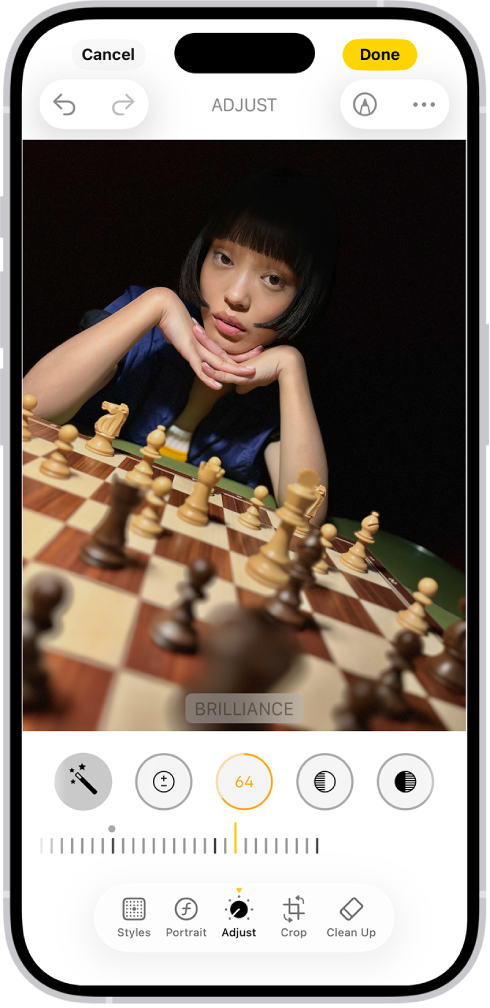
Open Photos, choose an image and tap the Edit button (sliders). Choose Adjust, swipe through the controls below the image and drag a selected control’s slider. Tap Done to save, or Cancel and discard the changes. Apple’s iOS 26 editing guide documents this interface.
Use this review sequence when you are not sure where to begin:
- Crop and straighten.
- Adjust exposure or brightness.
- Recover highlights and lift shadows.
- Correct warmth and tint.
- Add contrast and black point.
- Adjust color only if needed.
- Sharpen lightly.
- Reduce noise only when it is visible.
- Compare before and after.
- Save or export for the way the image will be used.
This is a learning sequence, not a mandatory processing order. Revisit brightness and color as needed; correcting exposure can change how you judge color. Review noise before adding sharpening, especially in dark photos.
Crop and Straighten First
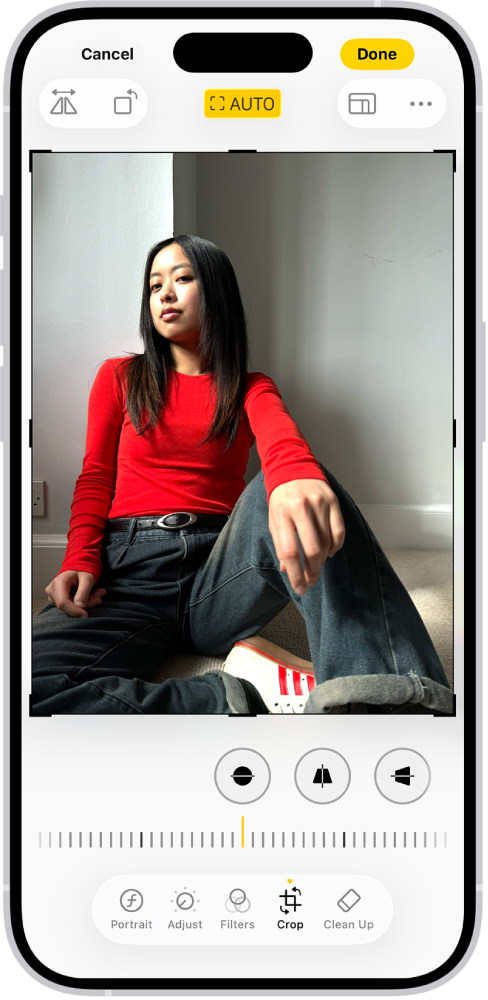
Cropping is the fastest way to make an iPhone photo feel stronger. Phone photos often include extra ceiling, pavement, table clutter, or people at the edge of the frame.
In the editor, choose Crop. Select Straighten and move the slider until a reliable horizon or doorway looks level. Drag the crop corners to choose the area to keep, or use the aspect-ratio button for a preset. If the ratio is locked, unlock it to change the shape. Tap Done when finished. See Apple’s crop and perspective instructions.
Crop tips:
- Keep eyes away from the exact center unless symmetry is intentional.
- Leave breathing room in the direction a person is looking or moving.
- Remove bright edge distractions.
- Keep vertical lines natural in architecture when possible.
- Try a square or vertical crop for social sharing only after you have a strong full-frame edit.
For phone-specific shooting advice before the edit, see the iPhone photography tutorial.
Fix Brightness Without Losing Detail
Brightness is usually the first slider beginners reach for, but it needs restraint. Make the subject readable, then protect important highlights.
If the face is dark, raise Exposure or Shadows cautiously. If the sky or white clothing is too bright, reduce Highlights. This can reveal detail retained in the file; it cannot reliably recreate information lost when all color channels clipped at capture. If the image looks washed out, review Contrast or Black Point after brightness is close. Photos has no separate Whites control: use Highlights and Exposure here.
| Problem | Useful adjustment | Watch out for |
|---|---|---|
| Face is too dark | Raise exposure or shadows | Noisy, gray shadows |
| Sky is too bright | Lower highlights | Dull, muddy sky |
| Photo looks flat | Add contrast or black point | Lost detail in hair or dark clothing |
| White object is glowing | Lower Highlights; check retained detail and overall Exposure | Making the whole image too dim |
Correct Warmth and Color
iPhone photos can look too warm under lamps, too cool in shade, or slightly green under mixed indoor lighting. Correct color before adding style.
Under Adjust, use Warmth to judge a warmer or cooler balance, and Tint to address a green or magenta cast. A wall or garment is not automatically neutral, and different complexions should not be forced to one skin color. Judge the subject under its actual lighting; mixed light may resist a single global correction. Preserve intentional sunset or candlelight warmth.
Avoid pushing saturation too early. If the photo is too dark or too flat, saturation can make the problem louder instead of fixing it.
Use Contrast for Shape
Contrast gives a photo depth. It separates the subject from the background and makes light feel more intentional.
Add contrast gradually. If the photo becomes harsh, pull it back or use smaller changes to black point and highlights instead. Portraits usually need softer contrast than architecture, food, or landscape photos.
A useful test is to zoom out. If the image reads clearly as a small thumbnail, the contrast is probably helping. If faces look harsh or shadows become empty, it has gone too far.
Edit Portraits on iPhone
Portrait editing should protect skin texture and expression. The best portrait edits usually look clean before they look stylized.
Portrait workflow:
- Crop around the person, not just the background.
- Set brightness so the face is clear.
- Adjust warmth for believable skin tone.
- Lower highlights on forehead, cheeks, or white clothing if needed.
- Add small contrast, then check skin texture.
- Sharpen gently, especially around eyes and hair.
- Avoid extreme saturation on skin.
Do not remove all shadows from the face. Gentle shadows help shape the portrait and keep it from looking flat.
For more portrait direction, read the portrait photography masterclass.
Edit Landscapes and Travel Photos
Landscapes often need highlight control, color restraint, and a strong crop. Start by deciding what the subject is: sky, mountain, building, water, street, or foreground detail. Then crop to support that subject.
For landscapes:
- Lower Highlights to reveal sky detail that remains in the source.
- Lift shadows only enough to reveal important foreground.
- Add contrast for depth.
- Keep greens and blues believable.
- Watch for halos around trees, rooftops, and mountains.
- Use sharpening carefully on fine detail.
If the scene has extreme bright and dark areas, the HDR photography and bracketing guide explains when multiple exposures are better than one heavy edit.
Edit Low Light iPhone Photos
Low light photos often have noise, motion blur, or strange color. Editing can improve them, but it cannot fully replace steady capture.
Review Warmth and Tint, then raise Exposure only as much as needed. Swipe through Adjust to Noise Reduction and use it cautiously if shadows are speckled. Review Sharpness and Definition at a close zoom; increasing edge contrast can exaggerate noise. Too much noise reduction can smear hair, fabric, signs and skin.
Low light checklist:
- Do not brighten the image until it looks like daylight unless that is the intent.
- Preserve the mood of lamps, candles, signs, and night scenes.
- Reduce noise after exposure changes.
- Avoid heavy sharpening on noisy files.
- Convert to black and white only when it supports the image, not as a rescue trick.
For capture help, use the low-light photography guide.
Keep a Consistent Look Across a Set
One edited photo can look good alone but feel wrong beside the rest. If you are preparing a gallery from a trip, event, or client session, check the set together.
Look for:
- Similar warmth across images shot in the same light.
- Similar brightness for related portraits.
- Consistent black point and contrast.
- Color that does not swing from muted to oversaturated.
- Crops that feel intentional as a group.
For similarly lit frames, open the edited photo, choose More (…) and Copy Edits; exclude changes you do not want copied. Return to the library, select the other frames, then use More and Paste Edits. Photos adapts exposure and white balance when matching. Review each frame; a different crop or lighting may need correction. Apple describes this in its linked editing guide.
Save, Export, and Share
Done saves a reversible edit inside Photos; it is not a JPEG quality dialog. To undo a saved edit, open the photo and use More (…) → Revert to Original. See Apple’s undo and revert instructions. A flattened copy in another app may no longer contain that history. Keep a separate backup: synced edits are not an independent archive.
For sharing, tap Share → Options. Automatic chooses a destination-compatible format; Current avoids format conversion; Most Compatible may convert photos to JPEG. Disable Location when it should not be shared. All Photos Data includes the original, editing history and metadata, and is available through AirDrop and iCloud links. Use it only when the recipient needs those data. See Apple’s sharing options.
For a specified pixel size or JPEG quality percentage, choose an editor with explicit export controls. Photos’ sharing format choice is not a promise that another service will preserve dimensions or avoid compression. Check your intended delivery file before using it as a master.
| Destination | Editing and export concern |
|---|---|
| Message or social post | Strong crop, clear subject, reasonable file size |
| Personal archive | Keep a separate backup of the original and an edited delivery copy |
| Client preview | Consistent color and enough detail for selection |
| Final client delivery | Confirm edited file dimensions, agreed format and gallery download settings |
| Use the lab’s requested dimensions after cropping: 8 × 10 inches at 300 ppi needs 2400 × 3000 pixels |
For a client set, SendPhoto offers gallery delivery, gallery passwords and download controls. Download settings concern a gallery or collection, not a unique viewing permission for each person. A password can be forwarded, and later changes cannot revoke copies already downloaded. Keep your own archive.
Quick iPhone Editing Checklist
- Choose the sharpest and best-timed frame.
- Crop and straighten before adjusting color.
- Brighten the subject without blowing highlights.
- Reveal retained detail in sky, windows and white clothing; do not expect lost capture data to return.
- Correct warmth and tint for believable color.
- Add contrast without crushing shadows.
- Keep saturation restrained.
- Sharpen lightly and reduce noise only when needed.
- Compare before and after.
- Review the final image in a set before sharing.
FAQ
What is the best first edit for iPhone photos?
Crop and straighten first, then adjust brightness. Those two changes usually make the biggest immediate difference.
Should iPhone photos be sharpened?
Light sharpening can help, but too much makes edges harsh and can make noise more visible. Apply it near the end.
Why do my iPhone edits look too orange?
The warmth or saturation is probably too high, or the original light was very warm. Reduce warmth first, then check saturation.
Can I edit professional-looking photos on iPhone?
Yes, if the source photo is strong and the edit is controlled. Good light, focus, timing, and composition still matter more than any slider.
Should I keep the original photo?
Yes. Photos can revert its saved adjustments to the original, but a delivered copy may not carry the editing history. Keep an independent backup of the source and the final delivery file.