
A photo library becomes difficult to manage when you can find a shoot folder but cannot identify the approved edit, its usage terms or the file you delivered. Digital asset management (DAM) gives those files searchable context and a repeatable route from capture to archive. It does not automatically provide backup or connect your editing software to a client gallery.
This guide helps you choose the missing part of your workflow, then trial it on one shoot. The Lightroom Classic steps below follow Adobe documentation; the screenshots are genuine examples from Adobe and SendPhoto. They are separate examples, not a record of a tested integration between the two products.
Why Photographers Need More Than Cloud Storage
Imagine a wedding shoot copied across a laptop, an external drive and a shared folder. More copies may help recovery, but names such as “Final Final 2” still leave questions unanswered. Which portrait did the couple approve? Which crop went to the album designer? Where is the editable master?
A DAM or photo catalog can store searchable information about your images. Depending on the software and configuration, that may include keywords, ratings, captions, locations and relationships between originals and derivatives. Decide which system owns each record; keeping two competing approval lists creates another source of confusion.
Storage protects files, but DAM organizes decisions
Storage holds bytes. A backup provides a recoverable copy under defined retention rules. A catalog helps you find and interpret the work. A useful library should let you answer:
- Which images belong to this client and shoot?
- Which selects still need retouching?
- Which file is the approved delivery version?
- What permission or usage record applies?
- Where are the original, edit and recoverable copies?
The IPTC Photo Metadata standard defines fields for descriptive, administrative and rights information. XMP is a way of representing metadata that may be embedded in a file or stored in a companion sidecar. Support varies by file format and application. Neither a keyword nor a copyright field proves that a client approved an image or granted permission to publish it; keep the actual agreement separately.
A consistent catalog can reduce searching and repeated naming work. It will not eliminate export or upload steps unless a specific, supported connection handles them.
Core Features of a Photography DAM
Choose features against a real library problem. A solo photographer who already finds work quickly may need a better naming and backup routine rather than another subscription. A studio with many shoots and contributors may need a searchable catalog and clear ownership of metadata.
Ingest should establish order immediately
Before importing a shoot, decide its project name, destination and naming pattern. Evaluate whether your chosen application supports these tasks:
- Copy to a predictable location. Keep originals separate from client exports.
- Avoid filename collisions. Include a project identifier or camera identifier when two cameras reuse the same image numbers.
- Apply accurate metadata. Use a creator preset only when it identifies the actual photographer; add project-specific captions and keywords deliberately.
- Verify recoverable copies. Confirm the intended files are present and readable in the working location and backup before reusing cards.
Camera EXIF can contain exposure and equipment details; GPS is present only when recorded. Review location and identifying information before publishing. Our metadata management guide covers inspection and selective removal without assuming that every platform preserves every field.
Search should match how photographers think
Try finding an image by client, date, subject, rating and a distinctive keyword. Check whether results include offline files and whether you can distinguish a preview from an available original. Semantic or face search, when offered, needs its own accuracy and privacy assessment. It is not a universal DAM feature.
Write down a small vocabulary: for example, “ceremony,” “reception” and “family portrait.” Decide how names, synonyms and spelling variants will be handled. A controlled list used consistently can be more useful than hundreds of unreviewed automatic keywords.
Version relationships also need configuration. IMatch documents file relations that link a master to derivatives, with rules for selected metadata propagation. That is a specific capability, not evidence that every catalog automatically connects a RAW, retouched TIFF and JPEG. Avoid copying all technical or location metadata indiscriminately between versions.
DAM vs Cloud Storage vs Client Galleries
These jobs overlap in some products, but you should evaluate them separately. An online gallery containing final JPEGs is not a replacement for the RAW files, edit instructions and recovery copies needed to reproduce a job.
A practical comparison
- DAM or photo catalog: Evaluate ingest, previews, metadata editing, search, version relationships and export. Confirm supported formats, offline behavior and how records leave the application.
- Cloud storage and synchronization: Evaluate shared-folder access, local availability, file history and recovery. Synchronization can propagate changes and deletions; a synced folder alone does not establish an independent backup.
- Backup service: Evaluate included drives and file types, exclusions, retention and restoration. Backblaze Computer Backup belongs in this category; do not treat it as interchangeable with a Dropbox or Google Drive collaboration folder.
- Client gallery: Evaluate presentation, access and delivery of selected exports. If you need selections, comments or approvals, verify those exact features in the chosen product and plan. They are not implied by the word “gallery.”
For each shortlisted tool, ask who can use it, what happens without internet access, where originals live and what survives cancellation. A category label does not answer those questions.
Choosing by the actual failure point
Lightroom Classic combines catalog organization with photo editing and export. IMatch is a dedicated DAM with documented file relationships. Neither reference establishes a native SendPhoto connection.
Photo Mechanic needs a more careful distinction. Standard Photo Mechanic remains an ingest and browsing tool; Camera Bits announced in February 2026 that Photo Mechanic Plus was no longer available for purchase after problems with its catalog technology. The Camera Bits announcement says the standard edition is unaffected. Do not buy standard Photo Mechanic expecting the former Plus catalog.
If retrieval is the problem, trial catalog search. If loss or accidental deletion is the problem, improve recovery. If clients struggle to receive finished work, evaluate a gallery such as SendPhoto, Pixieset, ShootProof or Pic-Time against your delivery requirements. Keep product selection separate from any assumption about automated connections.
Building a DAM-Centered Photography Workflow
Use the following as an adaptable studio procedure. Labels, filenames and statuses are illustrative choices, not universal application defaults.
Start with a controlled ingest
Create a project identifier, such as “2026-09-portrait-01.” Keep an originals folder, an edits folder and separate proof and final export folders. Preserve enough of the original filename to trace an export back to its capture.
Import or reference files according to your application's instructions. Check that the catalog points to the intended working location rather than a card or temporary download folder. Apply basic metadata, then verify the backup includes the actual photographs as well as catalog data.
Cull with consistent signals
Give ratings and labels one meaning across the studio. For example, use a rating to mark editorial quality and a separate status record for “needs retouching,” “ready to send” or “approved.” An internal rating is not client approval.
Hide rejected candidates from the active selection without immediately deleting the only copy. Use collections or filters where your application supports them. Review automatic recognition results, especially names and sensitive locations, before writing them into exported files.
Keep edits and exports connected
Keep the original capture available and use stable identifiers for derivatives. An illustrative pair is “portrait-01-0042-proof-v1.jpg” and “portrait-01-0042-final-v2.jpg.” Record which edit produced each delivery version. A revised crop should not silently replace a file that a client approved under the same name.
For a documented Lightroom Classic handoff, select the intended photographs and open File > Export. Choose a disk destination, naming and file settings, then review sizing, metadata and watermark options before exporting. Adobe's export workflow explains that export creates new files with the selected adjustments. Choose settings for the recipient's actual use rather than copying another photographer's preset blindly.
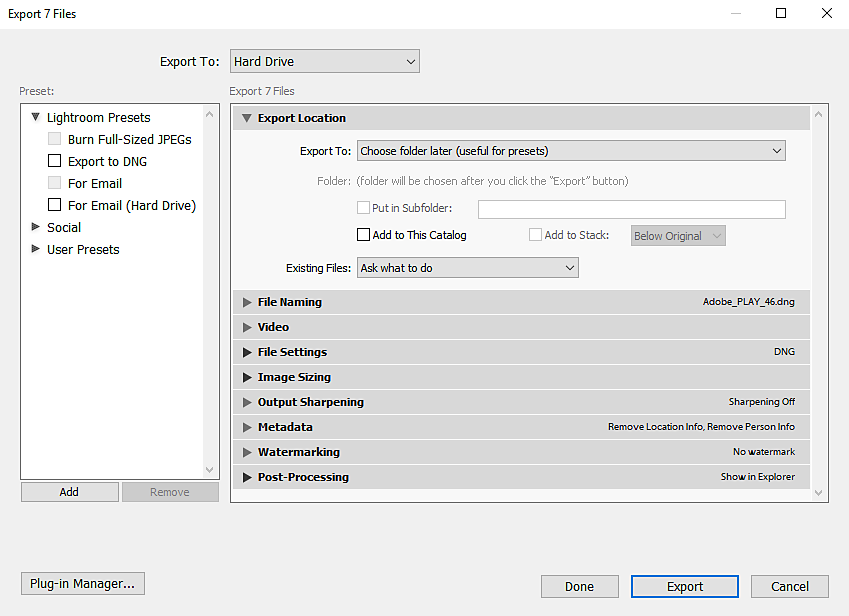
Open Adobe's export screenshot at full size.
For ordinary web viewing, a JPEG export is a common choice; a print lab or retoucher may specify something else. Check pixel dimensions, color profile, filenames and sensitive metadata on an exported sample. Preserve the full-resolution master independently of smaller delivery copies. See the photo organization software guide for the wider library context.
Archive the record, not just the pixels
Preserve originals, edited masters, required sidecars, catalog data and the delivered exports. Keep the approval or delivery record with the project, including the version sent and relevant permission documents. Do not assume the catalog records who approved a file unless that workflow is actually configured.
Adobe explicitly states that Lightroom Classic catalog backups do not back up the photographs or exports. Back those up independently. Restore a representative project into a separate location and confirm it opens before relying on the process for your whole archive.
Security, Pricing, and Migration Considerations
A good preview grid is only one part of the decision. Account access, local devices, recurring costs and your ability to leave the product affect the whole library.
Security needs operational controls
Ask each provider about encryption, account authentication, user permissions and access logs. Record the answer for the exact product and plan. For a local catalog, also consider device access, drive encryption and backup handling. These are evaluation questions, not a claim that every named tool includes every control.
Review what recipients can see and download before sharing. A password limits entry but does not stop an authorized viewer from copying what they can see. Watermarks can identify a preview; they do not establish permission or prevent all reuse. Keep licensing and release records alongside your copyright protection workflow.
If access should end, agree a date and assign someone to close it, or verify a supported expiry setting in the specific service. There is no universal 30–90-day delivery period to copy into every job.
Pricing is more than the subscription line
Compare the cost for your actual workload. Plan names alone do not tell you which features or limits apply:
- One photographer: Check licensing, supported computers, local storage and backup costs, plus the time needed to organize existing files.
- A shared studio: Check simultaneous use, additional seats, permission management and who maintains vocabulary and naming rules.
- A larger archive: Check storage growth, migration assistance, export access, integration charges and recovery time.
Confirm current terms before purchasing. A lower subscription may require more manual work; a larger plan may include features you never use. Keep active delivery storage and the master archive in your cost calculation; our storage management guide helps separate those decisions.
Migrate in phases
Inventory the current locations and keep the existing system available. Start with a copied, representative project containing originals, edited versions and metadata. Compare file counts and, for unchanged copied files, checksums. A checksum confirms matching bytes, not correct captions or a usable catalog.
Try exporting and reopening important fields in another application. Adobe's metadata documentation explains saving changes to XMP for other Adobe applications to read. That does not guarantee that another vendor will reconstruct collections, edit history or every application-specific field. Keep the catalog backup as well as portable metadata.
Connecting Your DAM to Client Delivery
A clear manual handoff is useful even when no integration exists. Export only the intended delivery set, inspect it, then upload those files to the gallery. Catalog edits made afterward do not automatically update a manually uploaded copy.
The ideal handoff
Use a small delivery record with the project, exported filenames, revision, recipient and date sent. Here is an illustrative manual sequence, not a measured Lightroom-to-SendPhoto test:
- Select the approved images in the catalog and export them into a clearly named delivery folder.
- Check the resulting files, including one revised image and any sensitive metadata.
- In the intended SendPhoto gallery, use Upload to add the exported files. Keep the original library and backups separately.
- Review the gallery's sharing settings and record the version delivered. Use the SendPhoto getting-started guide for the current setup steps.
- For a later revision, export a distinct version and update the delivery record so the client knows which file supersedes the earlier one.
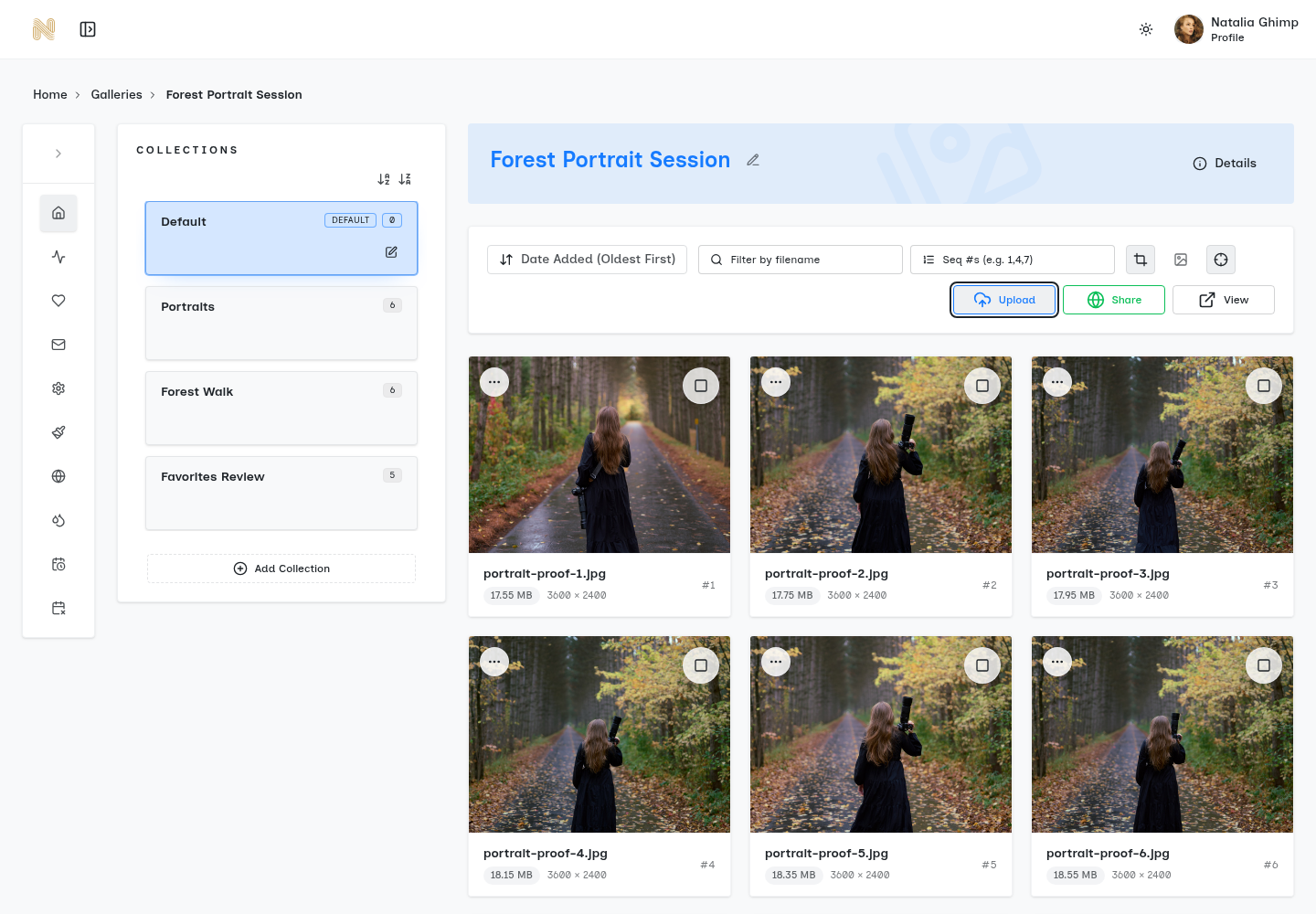
Open the SendPhoto Upload screenshot at full size.
Do not assume that catalog keywords become gallery tags, that a folder change updates a gallery, or that an approval transfers between systems. This guide does not establish a SendPhoto DAM connector, Zapier integration or webhook sync. If you evaluate an automation elsewhere, require documentation for its exact supported actions and failure handling before letting it publish client work.
Getting Started with Your First DAM Setup
Keep the first trial small enough that you can inspect the result completely:
- Choose one tool and one shoot. Trial ingest, finding specific images and exporting the required versions while retaining your existing archive.
- Create a metadata baseline. Agree creator, caption, keywords and usage-reference conventions. Confirm what stays in the catalog and what travels in exported files.
- Complete a deliberate delivery. Prepare the gallery from the checked exports, record the version sent and make sure you can restore the project's originals and catalog independently.
Measure time spent finding files, correcting names, exporting and handling revisions. Note missing metadata and any manual steps that remain. Decide whether the improvement justifies expanding to the next project; a complete archive migration can wait until recovery and portability are understood.
Ready to present your finished exports? Explore SendPhoto client galleries and keep your catalog, originals and independent backups as the foundation behind the delivery.